
Summary
Editor's rating
Value for money: strong if you hate monthly fees
Design and build: practical, not pretty
Battery life and power options: good, but depends how you set it up
Durability and reliability after daily use
Video, detection and app performance in real life
What you actually get with the doorbell + Home Hub Mini
Pros
- 2K video with 1:1 view gives clear head-to-toe and package visibility
- Local storage on doorbell and Hub Mini (up to 1 TB) with no mandatory subscription
- Decent AI detection for people, vehicles and packages with useful event filtering
Cons
- No chime included, so extra cost or reliance on phone/Alexa
- App is functional but not very polished, with occasional lag and complexity for new users

Specifications
View full product page →| Brand | Reolink |
A doorbell for people who hate subscriptions
I got this Reolink battery wireless 2K video doorbell with the Home Hub Mini because I was tired of cloud subscriptions and random “your trial has ended” messages. I wanted something that records locally, works over Wi‑Fi, and doesn’t nag me for monthly payments. On paper, this combo checks pretty much all those boxes: 2K video, AI detection, local storage on SD card and hub, and works with Alexa.
In practice, after a couple of weeks of use, I’d say it’s a pretty solid setup, but not magic. There are a few things it does very well, like the head‑to‑toe view and the package detection, and a few things that are just okay, like the app polish and the notification speed when the Wi‑Fi isn’t great. It feels more like a practical tool than a flashy gadget.
I installed it on a fairly normal house: regular router in the living room, front door about 8–9 meters away, two concrete walls in between. I also paired two other Reolink cameras to the Home Hub Mini, just to see how it behaves as a mini NVR. So this isn’t just a “took it out of the box and filmed my hallway” type of test; I actually used it daily for deliveries, visitors, and random motion events.
If you’re expecting something plug‑and‑play like a basic Amazon Ring, this one needs a bit more patience, but you get more control and no forced subscription. If you like tweaking settings and you already use or plan to use several Reolink cameras, it starts to make more sense. If you just want the simplest possible doorbell, there might be easier options.
Value for money: strong if you hate monthly fees
Where this combo makes the most sense is value over time. There are no forced monthly fees if you stick to local storage. Between the doorbell’s own microSD (up to 256 GB) and the Home Hub Mini’s microSD (up to 1 TB), you can store a lot of footage without paying anyone every month. For people who don’t like subscriptions or don’t trust cloud storage, that’s a clear plus.
You also get a decent list of features for the price: 2K video, AI detection for people/vehicles/packages, video call function, local weekly insights, and integration with Alexa and other smart home setups (and Home Assistant if you use the hub). Compared to some big-name brands where you have to pay to unlock basic “smart” features, here most of the stuff works out of the box. Reolink Cloud is optional, not mandatory.
On the downside, it’s not the simplest system. Setup is easy enough for a normal user, but if you want to tweak everything (zones, sensitivities, which events trigger alerts, how the hub records), be ready to spend some time in the app. Also, the missing chime in the box feels a bit stingy. For the price, it would have been nice to have at least a basic indoor chime included so you don’t have to add another product to your cart.
Overall, I’d call the value pretty solid if you plan to use the hub with several Reolink cameras and you care about local storage and privacy (AES‑128 encryption, anti-theft protection, etc.). If you just want a single doorbell and you don’t mind paying a few euros a month for cloud, there are simpler options out there. But if you’re building a small Reolink ecosystem, this pack makes financial sense and gives you good control over your data.
Design and build: practical, not pretty
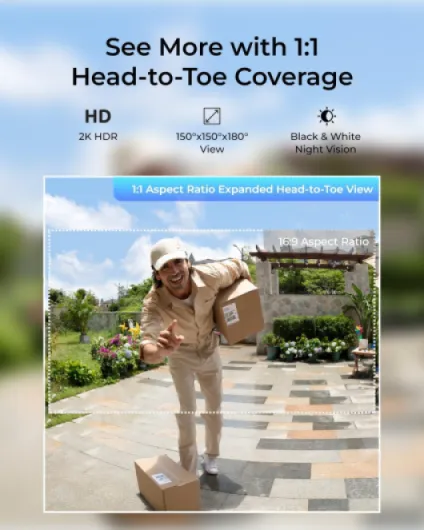
Design-wise, the doorbell is pretty standard. Rectangular, camera on top, button on the bottom. It’s not ugly, but nothing that will impress anyone. In my case, once it was on the wall, I just stopped noticing it, which is fine. The important part is that the 1:1 aspect ratio actually does what it’s supposed to: you see the person from head to toe and also packages on the floor. Compared to my old 16:9 doorbell, I see much more of the doorstep area.
The build feels decent. The plastic doesn’t feel premium, but it doesn’t feel cheap either. It’s rated as waterproof and it rained heavily twice while I had it up; no fogging, no water inside, no weird behavior. Buttons still click fine, and the lens stayed clear. For an outdoor device, that’s the main thing I care about: it should just survive weather without me babysitting it.
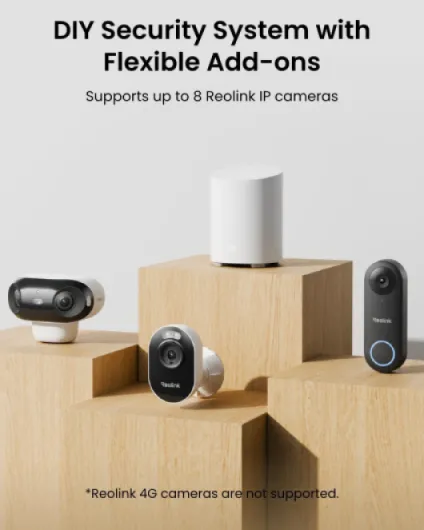
The Home Hub Mini is a small box you can hide next to your router or on a shelf. No big light show or anything, just a basic LED indicator. I like that it’s compact and doesn’t need much space. You pop a microSD card in, plug it into power and Wi‑Fi, and forget about it. It doesn’t make noise, doesn’t heat up a lot, and just sits there recording.
If you’re into super polished industrial design, this will feel pretty standard. But in terms of practical design—easy to wall mount, discrete, weather-resistant, and with a useful field of view—it gets the job done. I do wish the battery access was a bit more convenient (you have to remove the unit from the mount), but that’s pretty common with battery doorbells, so nothing surprising.
Battery life and power options: good, but depends how you set it up
The doorbell is battery-powered by default, with the option to hardwire it if you want continuous power. I used it on battery only during my test. With motion detection enabled for people and packages, plus around 10–15 events per day (deliveries, neighbors passing, random motion), the battery drain was roughly in the 6–8% per week range. That suggests you can get at least a couple of months out of a charge in a normal household. Obviously, if your door faces a busy street and it triggers all day, it will drain faster.
Charging is straightforward but a bit annoying because you have to take the doorbell off its mount. So if you’re not into climbing up and down a ladder every few months, I’d say either hardwire it or mount it at a height where you can easily pop it off. The good thing is that you can choose: rechargeable battery or wiring. Some systems force you into one or the other, so I like having the flexibility here.
One advantage of this setup is that recording doesn’t stop when the internet drops. The hub and the doorbell can keep recording locally on their SD cards even if the network is down. So you’re not relying on constant cloud access. From a power perspective, that also means you’re not stressing the battery with constant upload. The hub sits on mains power anyway, so that part is stable.
If you hardwire the doorbell, this becomes a non-issue and you basically treat it like a normal powered camera. If you stick with battery, just be realistic: if you crank the sensitivity up and let it record every car, cat, and leaf, you’ll be recharging more often. With reasonable settings, though, the battery life is decent and fits the usual “charge every few months” pattern most people can live with.
Durability and reliability after daily use
In terms of durability, I obviously haven’t used it for years, but I did expose it to some rough weather. We had wind, heavy rain, and a few cold nights. The doorbell didn’t show any signs of water getting in, and the image quality stayed the same. No condensation in the lens, no random reboots. The housing feels solid enough for outdoor use, and the button still clicks like day one.
The Wi‑Fi connection was stable as long as I didn’t push the router too far away. Once I moved the router to another room just to test, the signal dropped a bit and the stream took longer to load, but it didn’t disconnect constantly. If you have thick walls, I’d suggest placing the Home Hub Mini somewhere between your router and the doorbell to help keep things stable. The dual-band support (2.4 and 5 GHz) on the hub helps you find a sweet spot.
On the software side, the app didn’t crash on me, but it’s not the slickest thing on earth. Sometimes it takes a second or two to refresh the events list, and occasionally a thumbnail takes a bit to load. Nothing that breaks the experience, but it doesn’t feel ultra polished either. The good part is that once you set your zones and detection preferences, you don’t need to touch it much. The system just keeps recording and sending alerts.
Overall, from a reliability point of view, I’d say it’s solid enough for home use. It’s not perfect, but in two weeks of daily use I didn’t have any serious issues, no factory resets needed, and no corrupted recordings. If Reolink keeps the firmware updated over time, I don’t see a big reason why it wouldn’t last a few years on a wall without drama.
Video, detection and app performance in real life
The 2K (4 MP) video quality is honestly one of the strong points here. During the day, faces are clear, you can read logos on delivery uniforms, and you can easily see packages on the ground thanks to that 1:1 view. At night, it switches to infrared and the image is still usable. It’s not like daylight, but I can recognize faces and see what’s happening. No big motion blur unless someone is literally running past the door.
The smart detection (people, vehicles, packages) is decent. After a bit of tweaking, it correctly identified most packages dropped at my door and didn’t trigger for every single car that drove by. It still throws a few false positives when light changes quickly or when a big shadow moves, but that’s pretty standard for these things. I liked being able to filter the events by type in the app later; it makes it much easier to find a specific delivery event instead of scrolling through everything.
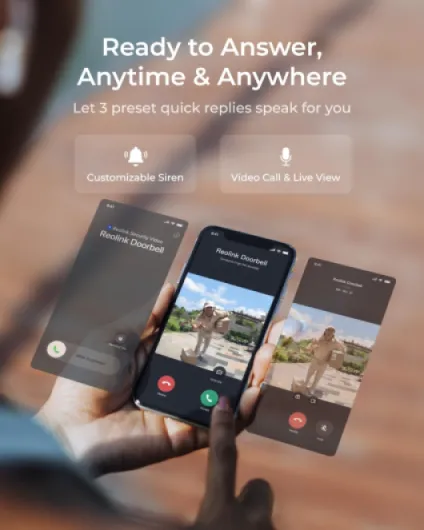
Where it’s a bit mixed is notification speed. When my Wi‑Fi was stable, the phone alerts came through in a couple of seconds, which is fine. When the 2.4 GHz band got crowded, I occasionally had 5–8 second delays, which is just on the edge of being annoying if you want to talk to someone before they walk away. The video call feature is handy, though: your phone rings like a regular call, and you can answer and talk directly, which feels more natural than just opening a push notification.
Streaming quality from the hub to the app was fine on 5 GHz Wi‑Fi. I liked that the Hub Mini supports both 2.4 and 5 GHz, so I could put it closer to the door and still get a solid connection. Once the cameras were added to the hub, switching between them was pretty quick in the app. Not instant, but fast enough that it didn’t bother me. Overall, in day-to-day use, performance is pretty solid, but if your Wi‑Fi is already struggling, you’ll feel it in delayed alerts and occasional buffering.
What you actually get with the doorbell + Home Hub Mini
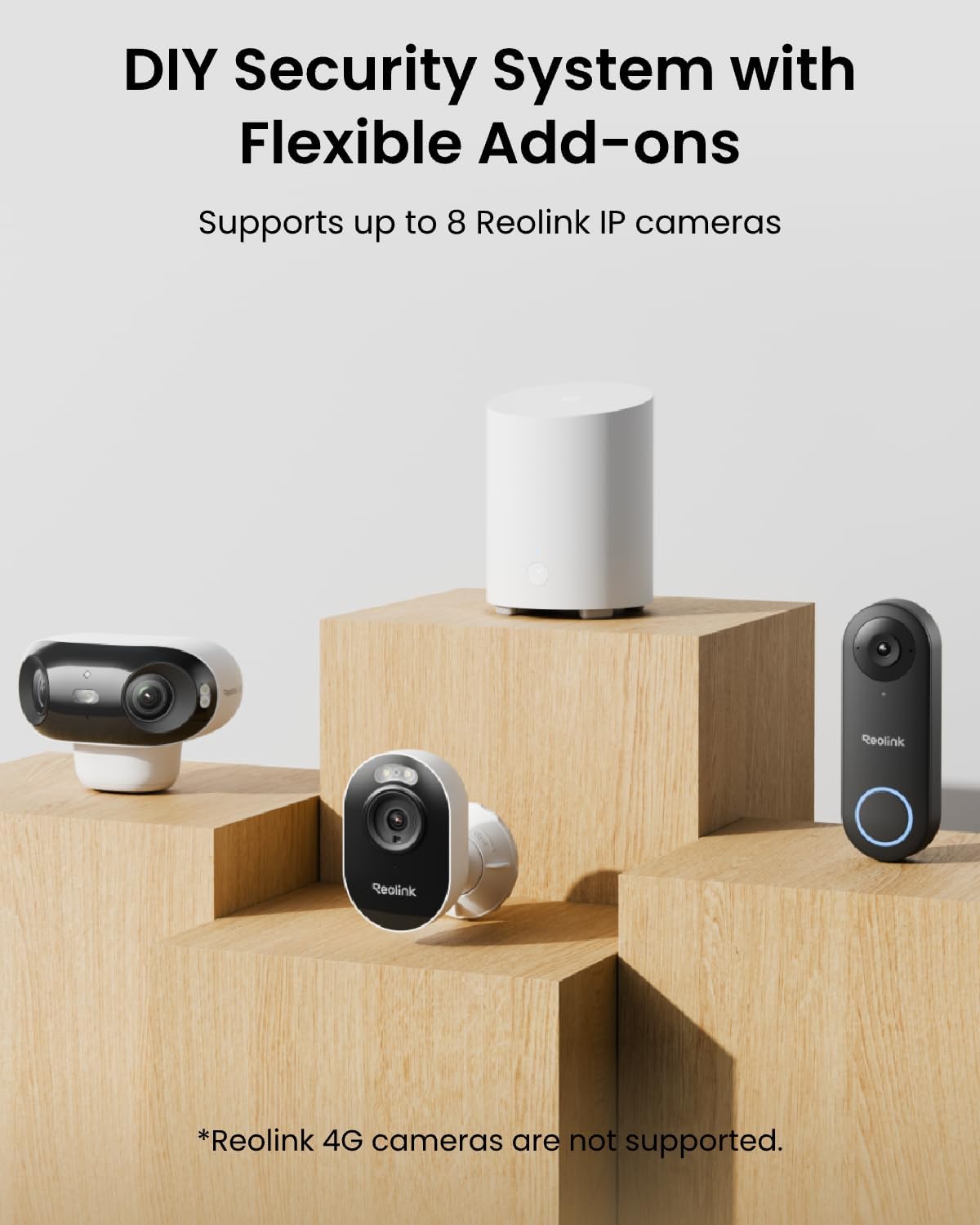
This bundle is basically two products: the battery-powered 2K video doorbell and the Reolink Home Hub Mini. The doorbell handles the usual stuff: video, motion detection, two-way audio, and the “video call” feature where your phone rings like a call when someone presses the button. The Home Hub Mini is like a small base station/NVR that connects to your Wi‑Fi (2.4 GHz and 5 GHz) and stores recordings locally on a microSD card up to 1 TB.
The doorbell itself supports a microSD card up to 256 GB, so you can technically use it without the hub and still record locally. But the hub gives you more storage and acts as a control center for several Reolink cameras (up to 12 MP, no 4G models). I linked two other Reolink Wi‑Fi cams to it, and it was nice being able to manage them all from one place: turn on/off spotlights, alarms, recording, etc. It’s not as fancy as a full NVR, but for a small apartment or house, it’s enough.
On the software side, the Reolink app is where everything happens. From there you get AI-powered weekly insights, so a kind of summary of events (people, vehicles, packages). You can filter by date, device, and type of motion. It’s not as polished as some big-brand UIs, but it does the job. Once you get used to where things are, it’s manageable, though there are a lot of options stuffed into different menus.
One thing that’s not super obvious when you buy it: the chime is not included. So if you want a traditional indoor chime that rings like a normal doorbell, you’ll need to add that separately or rely on your phone notifications and Alexa announcements. Also, if you want to hook this into Home Assistant, the doorbell alone isn’t enough; you need the Home Hub. So if you’re into home automation, that’s something to keep in mind before ordering.
Pros
- 2K video with 1:1 view gives clear head-to-toe and package visibility
- Local storage on doorbell and Hub Mini (up to 1 TB) with no mandatory subscription
- Decent AI detection for people, vehicles and packages with useful event filtering
Cons
- No chime included, so extra cost or reliance on phone/Alexa
- App is functional but not very polished, with occasional lag and complexity for new users
Conclusion
Editor's rating
After living with the Reolink battery wireless 2K video doorbell and Home Hub Mini for a bit, my take is pretty straightforward: it’s a good, no-nonsense option if you want local storage, decent image quality, and you don’t feel like paying subscriptions forever. The 1:1 head-to-toe view is actually useful, the AI detection is decent after some tuning, and the hub does a good job acting as a small control center for multiple Reolink cameras.
It’s not perfect, though. The app could be smoother, notifications can lag a few seconds if your Wi‑Fi isn’t solid, and the missing chime in the box is a bit annoying. Setup is not hard, but there are a lot of options, so you need to be okay with spending some time configuring things. If you just want plug‑it‑in and forget about settings, a simpler brand with a cloud plan might suit you better.
If you’re the kind of person who prefers local storage, control over your footage, and no monthly fees, and maybe already has or plans to buy more Reolink cameras, this combo makes sense and offers good value. If you mainly care about a super polished app and totally idiot-proof setup, you might want to look at more mainstream cloud‑focused doorbells instead.