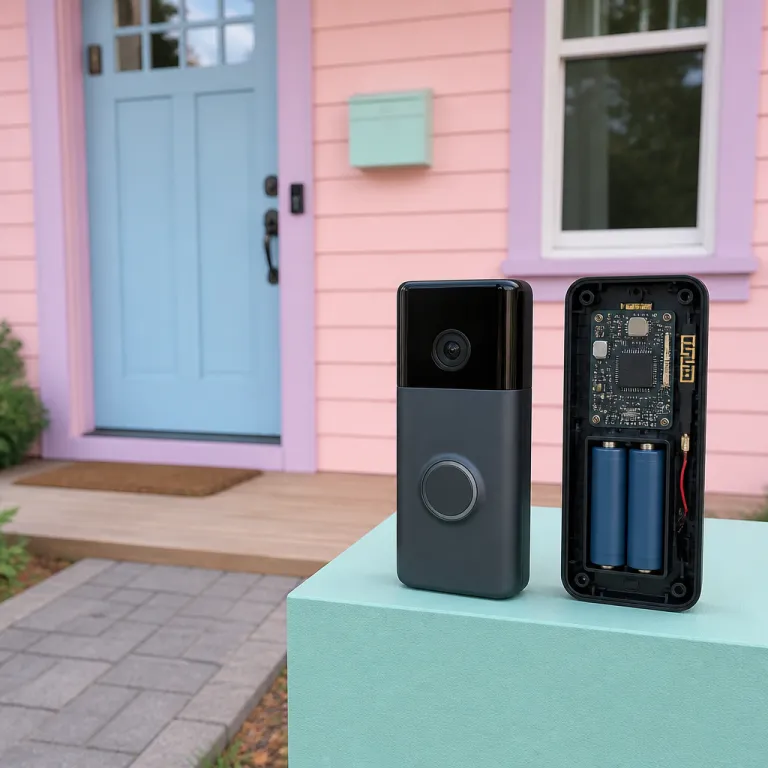
How does a Ring doorbell work from the moment someone approaches
A Ring doorbell is a compact smart security device that replaces or supplements a traditional chime at your front door. When someone walks toward the entrance, built-in motion detection sensors wake the unit and prepare the camera to record video. As soon as a visitor presses the button and you hear the doorbell ring, the system sends an alert to your phone through the Ring app in real time.
At the heart of how a Ring doorbell operates is a small camera that records high definition video and audio whenever motion or a button press is detected. This camera, often marketed as a video doorbell or Ring Video model, streams footage over your home Wi-Fi network so you can see a live view of your doorstep from anywhere. The same camera system is designed with night vision, which uses infrared light to capture clear images in low light conditions and helps protect your home during the hours when most people are asleep.
The Ring app on your smartphone acts as the control center for all Ring devices and Ring doorbells installed at your property. Within the app, you can adjust motion zones so the motion detection focuses on the path to your door rather than the street or a busy pavement. Each time the device senses movement or a doorbell ring, an icon will appear in the app timeline, and you can tap that icon to open live view, review recorded video, or manage settings for power, Wi-Fi, and alerts.
Power, battery, and wired options explained
Different Ring doorbells handle power in different ways, and this choice shapes how the system behaves day to day. A wired doorbell such as Ring Video Doorbell Pro 2 connects to your existing doorbell wiring and transformer, drawing continuous power so you never need to recharge a battery. In contrast, a battery doorbell like Ring Battery Doorbell Plus uses a removable rechargeable battery pack, which you slide out every few months to charge indoors before clicking it back into the device.
Some advanced models, such as a Doorbell Pro or similar premium video doorbells, can use both wired power and additional accessories for more stable performance. When a Ring doorbell is wired, it can often support extra features like pre-roll video on models such as Ring Video Doorbell 3, 4, and Pro 2, which capture a few seconds before motion detection triggers, giving you more context about who approached the door. Battery-powered devices still offer full motion detection and live view, but heavy use of live video or frequent motion events will drain the battery faster, so you must balance sensitivity and recording time.
In certain installations, Power over Ethernet (PoE) can supply both data and electricity to compatible video doorbells through a single cable. This type of connection is more common in professional or commercial setups than in typical homes, and is supported by specific models such as Ring Video Doorbell Elite, yet it shows how flexible these devices can be when integrated into larger security systems. Whether you choose a wired doorbell, a battery doorbell, or a hybrid device, the core product remains a smart video doorbell that turns a simple door into a connected security checkpoint.
Inside the technology: camera, motion detection, and night vision
To understand how a Ring doorbell works, you need to look closely at the camera and sensors inside the device. Every Ring doorbell model includes a wide-angle lens that captures a broad field of view, often described as head-to-toe coverage so you can see parcels on the ground as well as faces. This head-to-toe framing is crucial for security because it lets you verify deliveries, check for suspicious objects, and confirm who is at the door without opening it.
Motion detection relies on a combination of passive infrared sensors and software that analyzes changes in the video image. When the device detects motion within your defined motion zones, it wakes up, starts recording video, and sends a push notification to the Ring app on your phone or tablet. You can then open live view to see what is happening in real time, speak through the two-way audio, or simply let the recording upload to your Ring Protect cloud storage if you have an active subscription.
Night vision is another key part of how a Ring video doorbell protects your home around the clock. Infrared LEDs on the front of the device illuminate the area in front of the door, allowing the camera to capture clear black and white video even when the street lights are off. In the Ring app, a small moon icon or similar status icon will usually indicate that night vision is active, and you can adjust related settings if bright lights or reflections affect image quality.
Smart alerts, motion zones, and reducing false alarms
Smart alerts are designed to make motion detection more useful and less annoying for busy households. Within the Ring app, you can draw custom motion zones on the video preview so the device focuses on the path to your door and ignores passing cars or trees moving in the wind. By narrowing these motion zones, you reduce unnecessary alerts and extend battery life on battery doorbells, while still capturing important events at the door.
Some Ring doorbells and video doorbells support advanced motion detection features such as person detection or package detection, which use on-device processing or cloud-based analysis. These features help the product distinguish between a person walking up to the door and a car driving past, which improves security and saves you time when reviewing events. When you receive a notification, an arrow icon or similar visual cue in the timeline can help you scroll quickly through events and jump to the most relevant clips.
For people who want more control, the Ring Protect subscription and Ring Protect plan options unlock richer event history and smart notifications. With an active subscription, your Ring video recordings are stored in the cloud for a set time period, so you can review incidents days or weeks later if needed. Without a subscription, live view and instant alerts still work, but you lose the ability to go back in time and share video clips with neighbours, police, or insurance companies.
Power, wiring, and installation: getting your Ring doorbell on the wall
Installation is where many people first ask how a Ring doorbell will interact with their existing doorbell wiring and chime. If you already have an existing doorbell at your front door, a wired doorbell model can usually connect to that wiring, using the same transformer that powered the old chime. This approach keeps the device powered at all times and can allow your indoor chime to sound when someone presses the button on the new video doorbell.
Battery doorbells offer a different path, especially in apartments or older buildings without reliable wiring. You mount the device on the wall using screws and anchors, then insert the charged battery so the product powers up and connects to Wi-Fi through the Ring app. A separate plug-in chime or smart speaker can handle the audible doorbell ring inside your home, while the app sends notifications to your phone and other devices.
For more detailed step-by-step advice on mounting and alignment, many readers turn to a specialist installation guide such as the one on mounting the new Battery Doorbell Pro and handling installation quirks. That kind of resource explains how to angle the device so the camera captures the right head-to-toe framing and how to avoid glare that might affect night vision. It also covers how to check that the power supply, whether wired or battery, is stable enough to support features like live view and frequent motion detection without interruptions.
Positioning, Wi Fi, and power Ethernet options
Where you place the device on the door frame or wall has a direct impact on how effectively a Ring doorbell works in practice. Mounting too high can cut off the lower part of the frame and reduce head-to-toe visibility, while mounting too low might expose the device to accidental knocks or vandalism. The ideal height is usually around 1.2 to 1.4 metres from the ground, which balances facial recognition and parcel visibility.
Wi-Fi strength is just as important as physical placement, because every Ring video doorbell relies on a stable network to stream video and send alerts. If your router is far from the front door, a Wi-Fi extender or mesh system can help maintain strong signal and reduce lag in live view sessions. In some advanced setups, Power over Ethernet (PoE) can provide both data and power to compatible devices, though most consumer Ring doorbells still rely on Wi-Fi and either wired or battery power.
During installation, the Ring app will guide you through connecting the device, checking signal strength, and testing motion detection. You will see an icon change in the app when the doorbell ring is pressed, and you can use that feedback to confirm that the chime, notifications, and video are all working correctly. Taking the time to test each feature at installation saves you time later and ensures the product delivers the level of security you expect.
Everyday use: live view, alerts, and the Ring app experience
Once installed, everyday use quickly shows how a Ring doorbell fits into your routine. When someone approaches the door, motion detection triggers and sends a notification to your phone, tablet, or compatible smart display. You tap the alert or the event icon in the Ring app, and within seconds you are watching live view video of your doorstep.
Live view is more than just a passive video stream, because it includes two-way audio that lets you talk to visitors from anywhere. You can ask a courier to leave a parcel in a safe place, tell a friend you are on your way to the door, or warn an unknown visitor that they are being recorded, which can deter unwanted behaviour. This real-time interaction is one of the main reasons people choose a Ring video doorbell over a traditional doorbell, as it turns the door into a managed security checkpoint.
The Ring app also acts as a hub for multiple Ring devices and Ring doorbells if you have more than one entry point. You can group devices by location, adjust motion zones for each camera, and check the battery level or wired power status at any time. An arrow icon in the event history lets you scroll quickly through past recordings, while clear labels show whether each clip came from motion detection, a doorbell ring, or a manual live view session.
Subscriptions, Ring Protect, and managing your video history
Without any subscription, a Ring doorbell still provides live view, instant alerts, and two-way audio through the Ring app. However, many users choose a Ring Protect subscription or Ring Protect plan to unlock video recording, extended storage time, and advanced motion detection features. With Ring Protect active, every motion event and doorbell ring generates a video clip that is stored in the cloud for a defined period, allowing you to review incidents long after they happen.
Managing this subscription is straightforward, and you can add multiple devices or video doorbells under the same plan to save money. The app clearly shows which device is covered by a Ring Protect plan, and you can download important clips to local storage if you need to keep them beyond the standard retention time. For households that rely heavily on their video doorbell for security, the subscription turns a live-only product into a full evidence-gathering system.
When evaluating whether a subscription is worth the cost, consider how often you are away from home and how much you value the ability to go back in time. If you travel frequently or manage rental properties, having a searchable history of motion detection events and doorbell rings can be invaluable. For some people, the peace of mind that comes from knowing every important event at the door is recorded is the main reason they keep Ring Protect active year round.
Advanced models, accessories, and upgrading your setup
As you learn how a Ring doorbell functions, you may start comparing basic models with more advanced video doorbells. Entry-level devices focus on core features such as motion detection, live view, and standard definition or high definition video. Premium models like a Doorbell Pro or higher-end Ring Video units add features such as better night vision, dual-band Wi-Fi on devices like Ring Video Doorbell 3, 4, and Pro 2, and more refined motion zones that can reduce false alerts.
Some advanced Ring doorbells integrate with chimes, smart locks, and other security devices to create a more complete system. For example, you can set routines so that when the doorbell ring is detected, certain lights turn on automatically, which can make your home look occupied even when you are away. In multi-device setups, the Ring app becomes a central dashboard where you can check each device, review video history, and manage Ring Protect subscriptions for all connected products.
Accessories such as angled mounting wedges, solar chargers for battery doorbells, and plug-in chimes can refine how the system works in your specific home. An angled mount can improve head-to-toe coverage by tilting the camera toward the path, while a solar charger can extend battery life and reduce manual charging time. When you combine these accessories with a stable power source, whether wired or battery, and a reliable network, the overall security performance of your video doorbell system improves significantly.
Evaluating third party alternatives and complementary products
Some readers compare how a Ring doorbell works with other brands of video doorbells that offer different pricing or storage models. For instance, there are products that emphasize local storage and no monthly subscription, which may appeal to people who prefer not to rely on cloud services. A detailed review such as the one for a 2K battery powered video doorbell with on device AI detection and no monthly fee shows how different devices handle video, power, and security.
When comparing products, focus on how each device manages motion detection, night vision, and live view performance in real conditions. Check whether the app experience is intuitive, whether the icon layout makes it easy to find recordings, and whether the subscription model, if any, matches your expectations. Pay attention to whether the product supports Power over Ethernet (PoE), wired power, or only battery, because this will affect long term reliability and maintenance time.
Ring doorbells remain popular because they integrate smoothly with a wide range of smart home devices and offer a mature app ecosystem. However, understanding the strengths and limitations of both Ring video models and competing video doorbells helps you make a more informed decision. The best choice is the device that fits your door layout, your security priorities, and your willingness to manage subscriptions or local storage over the life of the product.
Moving, transferring, and long term ownership
Over time, many people face the question of how a Ring doorbell behaves when you move house or change tenants. Because the device is tied to your Ring app account, you must follow a clear process to remove it from one property and set it up at another. If you sell or rent out your home, you should transfer ownership properly so the new resident can connect the device to their own account and manage their own Ring Protect subscription.
A detailed playbook such as the guide on moving houses with Ring and handling uninstall, transfer, and reinstall can help you avoid common mistakes. That kind of resource explains how to remove the device from your account, reset it, and ensure that no old video or motion detection history remains linked to your profile. It also covers practical issues such as patching screw holes at the old door and choosing the best mounting position at the new property.
Long term ownership also means planning for battery replacements, firmware updates, and potential upgrades to newer Ring doorbells or video doorbells. The Ring app usually notifies you when a device needs an update, and applying these updates keeps security features current and can improve motion detection or night vision performance. When you eventually replace an older Ring doorbell with a newer product, you can often reuse existing wiring, mounts, or accessories, which reduces both cost and installation time.
Privacy, data, and responsible use
Understanding how a Ring doorbell works also involves thinking carefully about privacy and data handling. The device captures video and audio of people at your door, and sometimes of public spaces such as pavements or shared hallways. Responsible use means configuring motion zones to limit unnecessary recording and informing visitors that a video doorbell is in use, which many people do with a small sign near the door.
Ring Protect subscriptions store video in the cloud for a defined time, and you control who can access or share those clips. Within the Ring app, you can manage shared users, download important recordings, and delete events that you no longer need, which helps protect the privacy of family members and visitors. Some users also choose to disable audio recording in certain situations, balancing security needs with local regulations and personal comfort.
Over the life of the product, treating your Ring doorbell as part of a broader security and privacy strategy will serve you well. Combine strong Wi-Fi passwords, regular firmware updates, and thoughtful motion detection settings to reduce risks and maintain trust with neighbours and guests. Used carefully, a Ring video doorbell can enhance security without turning your front door into an intrusive surveillance point.
Key statistics about Ring doorbells and video doorbells
- According to Amazon’s Ring device announcements and earnings commentary, the company reports millions of active Ring devices worldwide, reflecting how video doorbells have moved from niche gadgets to mainstream security tools in a relatively short time.
- Independent tests by organisations such as Consumer Reports have shown that many popular video doorbells, including Ring models, capture clear facial details at distances of around 2 to 3 metres, which aligns with typical front door layouts.
- Surveys of homeowners in Europe and North America, summarised in smart home adoption reports from firms like Statista, indicate that a significant share of smart home buyers rank front door security cameras and video doorbells among their top three priorities when upgrading home technology.
- Industry analyses from market research providers such as Statista track steady growth in the smart doorbell market, with annual unit sales increasing year over year as more people seek app-based control and remote live view of their front doors.
- Studies on burglary patterns, including reports from national crime agencies and academic criminology research, consistently show that many offenders check for occupancy at the front door before attempting entry, which helps explain why visible video doorbells and motion detection lighting can act as effective deterrents.
FAQ about how a Ring doorbell works
How does a Ring doorbell connect to my phone
A Ring doorbell connects to your phone through your home Wi-Fi network and the Ring app. During setup, you use the app to put the device into pairing mode, select your Wi-Fi, and enter the password. Once connected, the device sends motion detection alerts, doorbell ring notifications, and live view video streams directly to your phone or tablet.
Do I need an existing wired doorbell to use a Ring video doorbell
You do not need an existing doorbell to use a Ring video doorbell, because many models are designed as battery doorbells. These devices mount on almost any surface and run on a rechargeable battery pack, which you remove and charge periodically. A wired doorbell connection is only required if you specifically choose a hardwired model or want to power the device from your existing transformer and chime.
Will a Ring doorbell work without a Ring Protect subscription
A Ring doorbell will work without a Ring Protect subscription, but with limited features. You still receive motion alerts, doorbell ring notifications, and access to live view through the Ring app, so the device remains useful for real-time monitoring. However, without Ring Protect, the system does not store video history in the cloud, which means you cannot review or share past events after they occur.
How long does the battery last on a Ring battery doorbell
The battery life on a Ring battery doorbell depends on how often motion detection triggers and how frequently you use live view. In a typical home with moderate activity, many users report several weeks to a few months between charges, often in the range of about one to three months when motion zones are configured carefully. Heavy use, high traffic areas, or very cold weather can shorten this time, so it is wise to keep a spare charged battery if you rely heavily on the device.
Can a Ring doorbell see clearly at night
Most Ring doorbells include infrared-based night vision that allows the camera to capture clear black and white video in low light. When night vision activates, the device uses built-in LEDs to illuminate the area in front of the door without visible bright light. This feature, combined with motion detection and Ring Protect video storage, helps maintain security around your entrance even when outdoor lighting is poor.
How do popular Ring models compare
The table below summarises a few well-known Ring video doorbells so you can see how power options, resolution, and standout capabilities differ at a glance.
| Model | Power type | Video resolution | Key features |
|---|---|---|---|
| Ring Video Doorbell (2nd Gen) | Battery or optional hardwire | 1080p HD | Standard motion detection, live view, two-way talk |
| Ring Video Doorbell 4 | Battery with optional wiring | 1080p HD | Colour pre-roll, dual-band Wi-Fi, improved motion zones |
| Ring Battery Doorbell Plus | Rechargeable battery | 1536p HD+ (head-to-toe) | Expanded vertical field of view, enhanced parcel visibility |
| Ring Video Doorbell Pro 2 | Hardwired | 1536p HD+ (head-to-toe) | 3D Motion Detection, Bird’s Eye View, dual-band Wi-Fi |
| Ring Video Doorbell Elite | Power over Ethernet (PoE) | 1080p HD | Flush-mount design, PoE reliability, professional-style installation |