
Summary
Editor's rating
Value for money: strong if you want to avoid subscriptions
Design and build: plastic but not cheap-feeling
Battery life: depends heavily on your settings and location
Durability and reliability: so far so good, with a few caveats
Video, AI detection, and app performance: good, but needs tuning
What you actually get and how it works in real life
Pros
- Good 2K video quality with 180° head-to-toe view and usable color night vision
- Local microSD storage up to 512 GB and free AI detection (person/package/vehicle), no mandatory subscription
- Includes chime, wedges, and flexible battery or wired installation options
Cons
- Real-world battery life can be far shorter than advertised in busy locations or with high sensitivity
- Tiny security screw is easy to drop and makes battery removal slightly annoying

Specifications
View full product page →| Brand | Tapo |
A budget-friendly doorbell that actually feels usable day-to-day
I’ve been using the Tapo D225 as my main doorbell for a few weeks now, and I’ll be straight: it’s not perfect, but for the price, it’s pretty solid. I swapped it in from a basic wired chime and a separate outdoor camera, so I was mainly looking for two things: clear video so I can see parcels and faces, and a setup that doesn’t annoy me with constant false alerts or app issues. On those points, it mostly delivers.
What surprised me first was how quickly I got it installed and running. I tried it battery-only at first and then tested it wired to an existing doorbell transformer. Both setups worked, but the experience is very different, especially for battery life and recording. If you expect to just slap it on the wall and get 6+ months of battery like the marketing says, that’s not what I saw in real life.
Day-to-day use is where this thing is decent. The app opens fast enough, the video is clear, and the chime plus phone notifications mean I actually know when someone is at the door, not just when a random car drives past. The AI detection (person/package/vehicle) is useful, but you still need to tweak sensitivity and zones, otherwise it can be a bit noisy with alerts.
So overall, my first impression is: good value, better than some of the big-name options if you don’t want a subscription, but you do need to spend a bit of time in the settings to get the best out of it. If you’re lazy with setup, you might be less happy, especially on the battery side.
Value for money: strong if you want to avoid subscriptions
Price-wise, the Tapo D225 sits in a nice spot: cheaper than most of the big name doorbells when you add up device + chime + storage, especially if you don’t want to pay a monthly cloud fee. The fact that you can stick in a microSD card (up to 512 GB) and be done with subscriptions is the main selling point for me. Cloud is there as an option (Tapo Care with around 30 days of history), but you’re not forced into it to get basic features like recording or AI detection.
When I compare it to Ring, for example, the difference is clear. With Ring, the hardware might be similarly priced, but to get proper video history and features, you’re basically pushed into a subscription. Over a couple of years, that adds up. With the Tapo, once you buy a decent microSD card, you’re set. The built-in AI detection being free (person/package/vehicle) is also a plus. You’re not paying extra just to know if it’s a person or a car at your door.
Where the value takes a bit of a hit is if you expect the battery life to match the marketing. If you end up charging it every few weeks or even days (in heavy traffic areas), that’s annoying. In that case, the value improves a lot if you can wire it in and forget about the battery. But even with that limitation, for what you get — 2K video, color night vision, head-to-toe view, chime included, AI detection, and local storage — it’s still good value overall.
If your budget is tight and you just want something that works, this is a decent option. If you’re okay paying more and you want super polished apps and integrations and maybe slightly better hardware, you might look at higher-end models. But for a practical, no-nonsense setup without ongoing fees, the D225 makes sense financially.

Design and build: plastic but not cheap-feeling
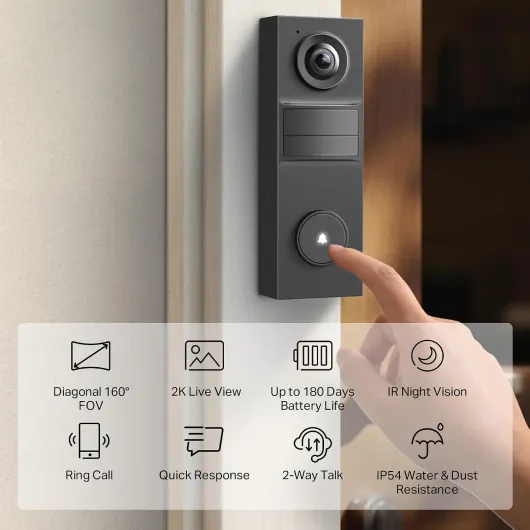
The design is pretty straightforward: a tall black rectangle with the camera at the top and the button at the bottom. It’s not going to win any design awards, but it doesn’t look ugly on the wall either. It’s fairly slim considering it has a 10,000 mAh battery inside, and it doesn’t stick out too much from the door frame. If you’ve seen other smart doorbells from Ring or Eufy, this sits in the same general size range, maybe a bit slimmer than the really chunky ones.
The build is all plastic, but the finish doesn’t feel super cheap. The IP65 rating is reassuring; I’ve had it in rain and some wind, and it handled it fine. No fogging on the lens so far and no water getting into the button. The button itself has a clear ring light that makes it obvious where people need to press, even at night. That might sound basic, but I’ve had visitors miss the button on other models that had weird designs.
One thing I liked is the included wedges: a 15° horizontal and a 5° vertical wedge. In practice, these are actually useful if your door is slightly recessed or your doorway is at an angle to the path. I used the horizontal wedge to tilt it a bit towards the path so I could see people before they’re right at the door. This also helps reduce motion triggers from the street by pointing the view more towards the porch area.
The only small downside in terms of design is the security screw underneath. It’s good that it’s there so someone can’t just yank the doorbell off, but the screw is tiny. You really want a towel or something under it when you remove or reattach it, like one Amazon reviewer mentioned, because if you drop it in gravel or grass, you’re going to be annoyed. It would have been nice to have a spare screw in the box.
Battery life: depends heavily on your settings and location
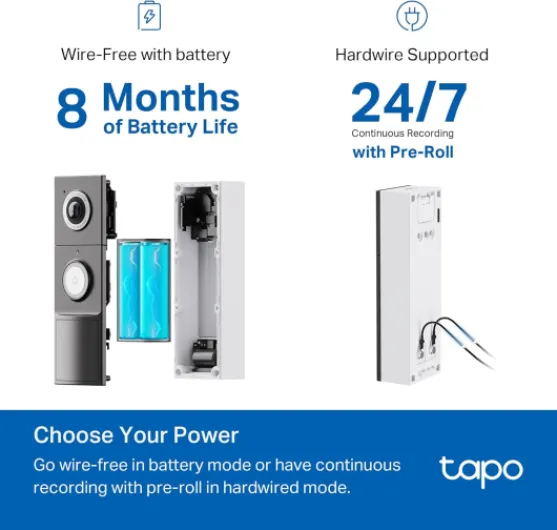
This is the part where reality doesn’t fully match the marketing. Tapo claims up to around 180 days (about 6 months) on the 10,000 mAh battery. In my case, with medium traffic at the door and fairly aggressive notifications and recording settings, I was nowhere near that. I was more in the range of several weeks, not months. I’ve also seen user reviews mentioning needing to charge every 4–5 days, which to me suggests either very high traffic, very high sensitivity, or some settings that are not optimized.
When I first installed it, I left everything pretty much on: motion detection at medium-high sensitivity, AI detection for person + vehicle + package, notifications for all events, and recording to SD card for each event. In that mode, with a busy street and people walking by regularly, the battery dropped much faster. After about a week, I was already thinking about recharging. So I went back into the app and started cutting things down: reduced sensitivity, tightened the activity zone to just my driveway and door area, and disabled vehicle detection.
After tweaking, battery life improved noticeably. I didn’t get to 6–8 months like the spec sheet suggests, but it became reasonable to expect several weeks between charges in my situation. If you live on a quiet cul-de-sac with few visitors and lower sensitivity, you’ll obviously get longer life. If you’re on a main road and you treat it like a 24/7 security camera that records everything, just accept that you’ll be charging it often, or wire it in.
Charging itself is not painful: it takes a few hours to go from low to full using the included USB adapter cable and a normal charger. You do have to physically remove the doorbell from the bracket, which is where that tiny screw is annoying again. If you’re planning to keep all the features on and you hate the idea of taking it down regularly, I’d strongly suggest wiring it to an existing doorbell transformer. Wired, you can also do continuous recording, which basically removes the battery headache entirely.
Durability and reliability: so far so good, with a few caveats
In terms of durability, I can’t pretend I’ve used it for years, but after a few weeks outside in rain and some colder nights, it’s holding up fine. The IP65 rating seems legit: no water has gotten into the button, no condensation inside the lens, and the casing still looks the same as day one. The plastic doesn’t feel fragile, and the mounting bracket grips the unit firmly once the security screw is in. There’s no wobble when you press the button.
Connectivity reliability has been good in my case. I’m using a mid-range Wi‑Fi router, and the doorbell is about 8–9 meters away through one brick wall. I’ve not had random disconnects or had to re-add it to the app. That lines up with some of the positive user reviews saying it doesn’t drop connection like some cheaper brands. Obviously, if your Wi‑Fi is weak at the door, you might have a different experience, but that’s not really the product’s fault.
The included chime has also behaved fine. It’s just a small plastic box you plug into a socket, but it hasn’t overheated or glitched out. The range between the doorbell and the chime in my house (two rooms away) is not an issue. I haven’t tested it through multiple floors, but for a standard house layout it seems okay. The only thing I’d watch out for long term is the microSD card: like with any camera, use a decent endurance card, otherwise you’ll end up with corrupted clips or a card that dies early.
Overall, in terms of durability and reliability, it feels like a mid-range smart device: not ultra-premium, but solid enough for everyday use. The main weaknesses are more about battery expectations and the tiny security screw than any obvious build flaw. I’d be more worried about a cheap no-name doorbell than this, especially given Tapo/TP-Link already has a bunch of other cameras in the market.
Video, AI detection, and app performance: good, but needs tuning
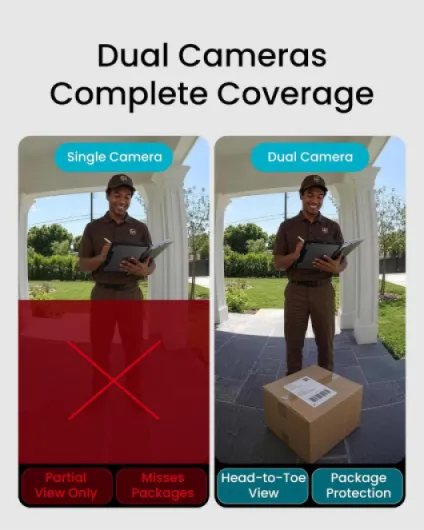
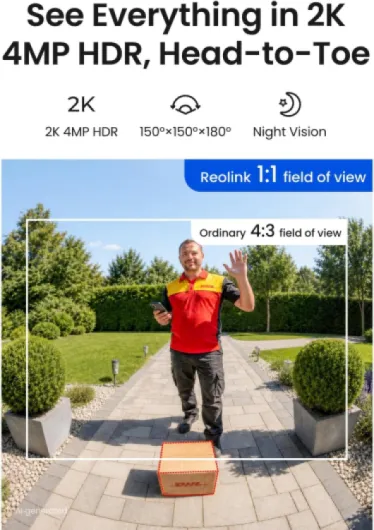
On the video side, the 2K QHD resolution is genuinely useful. Faces are clear, even when you zoom in a bit, and the 180° head-to-toe view means you can see packages left right under the door and still see the person’s face. Compared to a 1080p Ring I used before, this is sharper, especially for text like delivery labels or license plates if the car is fairly close. The color night vision with the spotlight on is also decent: you see colors, not just grey blobs, which helps to identify people and objects.
Night vision without the spotlight is still fine, but if you really want detail, leave the spotlight enabled. You can adjust its brightness so it doesn’t blind people too much, but it’s still a light in their face, so be aware of that. I found a middle setting where the image is bright and usable without turning the porch into a football pitch. Motion detection at night is okay, though like with all these devices, heavy rain or insects can still trigger it sometimes.
The AI detection for person, package, and vehicle is the part I had to tweak the most. Out of the box, it was a bit too chatty for my taste. It picked up cars on the street and people just walking past the house. After I set up an activity zone that focused on my path and doorstep, and lowered sensitivity a bit, it became much more reasonable. Then it mostly alerted me when someone came onto the property or a package was dropped. The package detection is not magic, but when a delivery driver left a box, I did get a package alert most of the time.
App performance is solid. The live view loads in a few seconds on Wi‑Fi and a bit slower on 4G, but still acceptable. Two-way audio is clear enough; I could talk to drivers and they could hear me fine, with a small delay as expected. I didn’t have any random disconnects or the constant re-pairing issues some people complain about with other brands. Overall, on performance, I’d say it gets the job done well, as long as you’re willing to spend time setting zones and detection properly.

What you actually get and how it works in real life
Out of the box, you get the doorbell unit, a separate chime, mounting bracket, wedges, screws, anchors, a little USB adapter cable for charging, and a tiny pin to detach the doorbell from the bracket. No microSD card in the box, so if you want local recording without cloud, you need to buy one (up to 512 GB supported). I used a 64 GB card and that was more than enough for a couple of weeks of motion clips with no problem.
The chime is simple but useful. You plug it into a socket inside the house, pair it with the doorbell via the app, and it just works. Volume is decent and there are a few tones; nothing fancy, but you can hear it over TV noise. You can also use Alexa or Google devices as extra chimes, which is handy if you’ve already got smart speakers around the house. I had it ringing on an Echo plus the included chime and it synced fine.
The app side is where most of the value is. You can set motion zones, choose whether you want person/package/vehicle detection, and decide if you want just notifications or recordings too. There’s also the Ring Call feature, which basically makes your phone ring like a call when someone presses the doorbell. That part is genuinely practical; you don’t have to dig into the app, you just answer like a call and see/talk to the person. It doesn’t use your cellular minutes; it’s app-based.
Overall, as a package, it feels like a complete system: doorbell, chime, app, and the option to store locally or via cloud. It’s not flashy, but everything you actually need is there. Just remember that to really benefit from it, you should invest in a decent endurance microSD card and spend 20–30 minutes going through all the app options at the start.
Pros
- Good 2K video quality with 180° head-to-toe view and usable color night vision
- Local microSD storage up to 512 GB and free AI detection (person/package/vehicle), no mandatory subscription
- Includes chime, wedges, and flexible battery or wired installation options
Cons
- Real-world battery life can be far shorter than advertised in busy locations or with high sensitivity
- Tiny security screw is easy to drop and makes battery removal slightly annoying
Conclusion
Editor's rating
After living with the Tapo D225 for a bit, my feeling is that it’s a good, practical video doorbell with a few quirks you need to be aware of. The strong points are clear: solid 2K video, useful 180° head-to-toe view, color night vision that actually helps, and the fact you can store everything locally on a microSD card without paying a subscription. The app is usable, the chime works, and the AI detection becomes quite reliable once you tune the zones and sensitivity.
The weak spots are mostly around battery expectations and some small design details. If you’re in a busy area and you leave all detections and recordings on, don’t expect multi-month battery life. You’ll either be recharging more often than you’d like or you’ll end up wiring it. The tiny security screw is also a bit of a hassle when taking the unit off to charge. None of this is a deal-breaker, but it’s worth knowing before you buy.
I’d recommend this to people who: want to avoid monthly cloud fees, already use or don’t mind using the Tapo ecosystem, and are willing to spend 20–30 minutes configuring motion zones and detection properly. If you live on a really busy street and absolutely need long battery life without wiring, or you want the most polished smart home integration out there, you might be happier with a higher-end model from another brand. But as a straightforward, good-value doorbell that gets the job done, the Tapo D225 is a solid pick.