
Summary
Editor's rating
Value for money: good for Apple users, less convincing for others
Design and build: compact, decent looking, but heat is a real factor
Battery life and power: flexible, but not magic
Durability, weather, and connectivity in real life
Video, motion, and smart features: when it works, it’s pretty solid
What you actually get and how it’s supposed to work
Pros
- Strong HomeKit Secure Video integration with no mandatory subscription
- Includes chime-repeater with microSD support for local and 24/7 recording
- Good 1080p image quality and fairly quick live view loading
Cons
- Can overheat and go offline in direct sun or hot climates
- Wi‑Fi can be unreliable through metal doors or thick concrete walls
- Overall reliability and motion tuning require some trial and error

Specifications
View full product page →| Brand | Aqara |
A HomeKit doorbell that tempted me away from Ring
I picked up the Aqara Video Doorbell G4 because I wanted something that plays nicely with Apple Home, doesn’t force a subscription, and still gives me proper recordings. I’d been using a Ring before, and I was tired of paying monthly just to see who rang my door. On paper, this Aqara checks a lot of boxes: 1080p, local storage, HomeKit Secure Video, face recognition, and it even comes with a chime in the box.
I’ve been using it for a few weeks, mostly in a mixed setup: wired power from my old doorbell transformer plus the included batteries as backup. My Wi‑Fi is solid (decent router, other outdoor cameras work fine), so I wasn’t expecting connection drama. I also live in a place that gets hot sun in the afternoon but not desert-level heat, so I paid attention to all the reviews talking about overheating.
My main goal was simple: when someone shows up, I want a fast notification, a quick live view, and a clear video history without extra fees. I also wanted my existing HomePods and iPhones to handle chimes and notifications. I don’t care much about goofy features, but I was still curious about the voice changer and custom ringtones, just to see if they’re a gimmick or actually useful.
Overall, the doorbell does a lot of things pretty well, but it’s not flawless. Between the heat sensitivity, Wi‑Fi quirks through thicker walls, and a bit of setup fiddling, it’s not a universal “just works” product. If you’re in the Apple ecosystem and willing to tweak things a bit, it can be a good fit. If you just want something you install once and never think about, this might annoy you at times.
Value for money: good for Apple users, less convincing for others
In terms of value, I’d say the Aqara G4 sits in a pretty solid middle zone. It’s not dirt cheap, but it’s usually priced below some of the bigger names like Nest and some Ring setups, especially when you factor in that it includes the chime and doesn’t force a subscription for basic storage. You get local microSD recording, optional 24/7 recording when wired, and free 7-day event cloud from Aqara, plus HomeKit Secure Video if you already pay for iCloud. If you’re already in Apple’s world with a 2 TB plan, this fits in nicely without extra monthly fees.
Where it feels like good value is for people who want local control, HomeKit, and flexibility. You’re not locked into a single ecosystem; it also works with Alexa, Google, and IFTTT. The chime being included is a big plus, because some brands make you buy that separately. The little extras like voice changing and face recognition are nice bonuses, even if they’re not perfect. For the price, getting 1080p video, decent night vision, and local storage options is fair.
On the downside, the reliability complaints are hard to ignore. The Amazon rating hovering around 3.6/5 says a lot: some people love it, others hate it. If you’re unlucky with heat or Wi‑Fi conditions, the value drops fast because a doorbell that’s offline half the time is basically wasted money. Also, if you’re not on Apple and you don’t care about HomeKit, there are simpler options from Eufy, Ring, or others that might be less fiddly and similarly priced.
So, is it good value? For an Apple Home user who wants local storage and doesn’t mind tweaking settings and placement, yes, it’s good value for money. For someone who just wants a plug-and-play doorbell with zero drama and doesn’t care about HomeKit, there are probably better choices at the same or slightly higher price that will feel less “meh but works” and more consistent day to day.
Design and build: compact, decent looking, but heat is a real factor
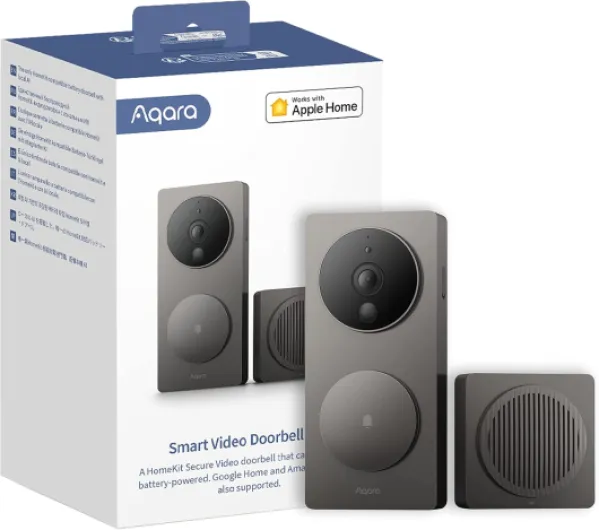
Design-wise, the Aqara G4 is pretty low-key. It’s a rectangular unit in shadow gray, not huge, not tiny. It doesn’t scream “security camera” like some bulkier doorbells. On my door frame it looks fine, just a modern little block with a big button and a camera above it. If you want something flashy, this isn’t it, but I prefer that it just blends in. The button has a clear ring and is easy to find, even at night.
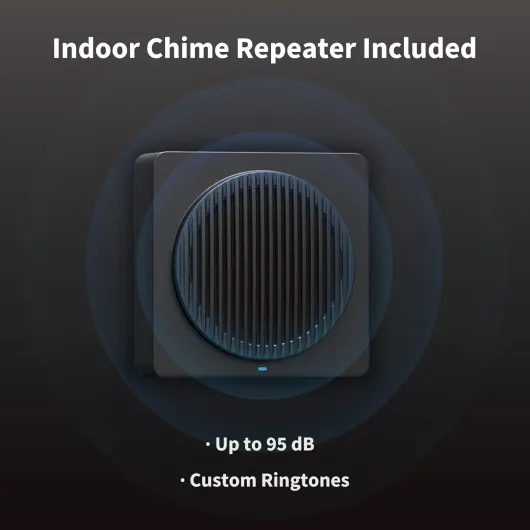
The build feels okay for the price. It’s rated IP66, so it should handle rain and dust. Mine has already gone through a couple of heavy rain days without any leaks or weird behavior. The front plastic doesn’t feel premium, but it also doesn’t feel cheap toy-level either. Let’s just say it’s decent but nothing more. The chime unit inside is very plain: a small box that plugs in like a smart plug, with vents for the speaker and a microSD slot hidden on the side.
Now, the big design downside is heat handling. The device has a temperature protection feature, which sounds nice until it kicks in more often than you’d like. If the sun hits it directly for hours, it can throw a high-heat error and go offline until it cools down. I’ve seen this once so far on a very sunny afternoon, and I’ve seen multiple user reviews saying the same, some much worse. If your door is in full sun most of the day, especially in hot states, expect this to be an ongoing annoyance unless you mount it in shade or add a little hood.
So from a design perspective: visually it’s fine, the size is practical, and installation hardware is straightforward. But it’s not the toughest doorbell when it comes to direct sunlight and high temperatures. I’d say it’s best suited for porches, recessed entries, or at least some kind of cover. If you slap it on a south-facing wall in open sun in a hot region, you’re kind of rolling the dice.
Battery life and power: flexible, but not magic
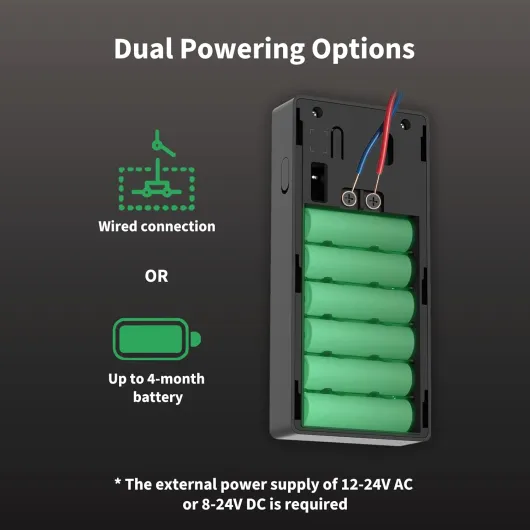
One of the selling points is that the G4 can be battery-powered or wired. It uses 6 AA 1.5V batteries, which are included. I started with it on batteries for a few days to see how it behaves, then wired it to my existing doorbell transformer. On batteries only, with motion detection tuned down a bit and a normal amount of doorbell presses, the drain was reasonable. After about a week of testing, I hadn’t burned through a huge percentage, so I’d expect a couple of months at least in a low-to-medium traffic setup. If you have a very busy street or high motion sensitivity, don’t expect miracles; more events mean more battery use.
Once I wired it up, things got a lot more comfortable. In wired mode, the doorbell can do 24/7 recording to a microSD card in the chime, which it can’t do on batteries. The batteries then act more like a backup in case the power goes out. For me, this is the best way to run it: you get constant power, all the features, and you don’t have to climb up and swap batteries every few months. If you don’t have existing doorbell wiring, you’ll need to decide if you’re okay with the maintenance of battery-only use.
One detail I liked: Aqara actually thought about the security screw that holds the doorbell to the mount. It’s a small thing, but on some brands I’ve dropped that screw more than once while changing batteries, and it’s a pain. Here it’s a bit better designed, and the battery compartment is not overly fiddly. Still, unscrewing, popping off the unit, and swapping 6 AAs is not something you want to do often, so if you can wire it, do it.
Overall, the power situation is flexible but not magical. Battery life is decent if you’re realistic about your settings and traffic, but heavy use will drain it. Wired mode is where the doorbell really makes sense, especially if you want 24/7 recording. So if you’re planning to use it purely wireless in a very busy area, just know you’ll be dealing with batteries more often than you might like.
Durability, weather, and connectivity in real life
Durability is a bit of a mixed bag here. On the one hand, the IP66 rating and overall construction seem fine for rain, wind, and dust. Mine has handled bad weather with no leaks or fogging behind the lens. The plastic hasn’t warped or discolored yet, but it’s still early days. I’ve seen user reviews from very hot regions saying the casing holds up better than some competitors, which is good, but the electronics inside still struggle with temperature.
The real problem is how the doorbell behaves in heat and through walls. You have people in hot areas saying it keeps working at 120°F in full sun, and others getting constant overheating messages at much milder temperatures. From what I see, placement is everything. If you mount it in shade or at least out of direct afternoon sun, it’s probably fine. If it’s on a metal door or exposed wall with full sun, you increase the odds of shutdowns. I’ve had one heat-related shutdown and a few short random disconnects where it dropped offline for a minute or two and then came back.
Wi‑Fi durability is another point. This thing only supports 2.4 GHz, and it does not love metal doors or thick brick/concrete. If your home is built like many in the US with wood and drywall, you’re probably okay. If you’re in a house with solid concrete walls or a heavy metal security door, signal between the doorbell, chime, and router can get rough. One user flat-out said it’s basically designed for wood-frame houses, and I get where they’re coming from. In my case, with normal walls and the router not too far away, it’s fine, but you need to think about where the chime is plugged in.
So in terms of durability: weather and basic wear seem okay so far, but environmental factors (heat, wall materials, door type) matter a lot. If your setup is Wi‑Fi-unfriendly, this doorbell can feel fragile and unreliable. If your placement is good and your Wi‑Fi is strong, it feels much more stable. It’s not a tank that works anywhere no matter what; it’s more sensitive than that.
Video, motion, and smart features: when it works, it’s pretty solid
On the performance side, the video quality is good for 1080p. Compared to my old basic doorbell, the image is clearly sharper, especially around faces and text like delivery labels. HomeKit caps it at 1080 anyway, but even inside the Aqara app the image looks slightly cleaner than some other 1080p cameras I’ve used. Night vision is fine: you can see who’s there, read larger text, and the contrast is okay. It’s not cinema-level, but for a doorbell, it gets the job done.
Motion detection and notifications are where you’ll spend time tuning. Out of the box, it was a bit too sensitive for me, picking up people just walking past on the sidewalk. After adjusting the detection zone and sensitivity, it calmed down and mostly focused on people actually coming to the door. Notifications on my iPhone and Apple Watch usually come within a couple of seconds of someone pressing the button. Motion-only events can sometimes lag a bit more, but still within a reasonable window. Compared to my old Ring, the load time for live view is a bit faster, especially through HomeKit, which is nice when you’re trying to catch a delivery driver before they walk away.
Face recognition is one of the more interesting features. It works locally, and you can use faces from Apple Photos or set them up in the app. In my experience, it’s hit or miss at first but gets better after a few days. It often correctly labels family members, but sometimes it just says “unknown person” even if it’s someone it should know. I wouldn’t rely on it for anything critical, but it’s handy for knowing if it’s a stranger or someone regular at the door.
The extra stuff like the voice changer and custom ringtones is more novelty than essential, but it does work. I tried the “robot” voice once just for fun, and it actually does disguise your voice. The custom ringtones on the chime are more useful: you can assign different tones to different doors if you have more than one G4. Overall, performance is pretty solid when the unit is online and not overheated, but it’s not perfect. Expect the occasional hiccup in motion detection or face recognition, but nothing that makes it unusable.
What you actually get and how it’s supposed to work
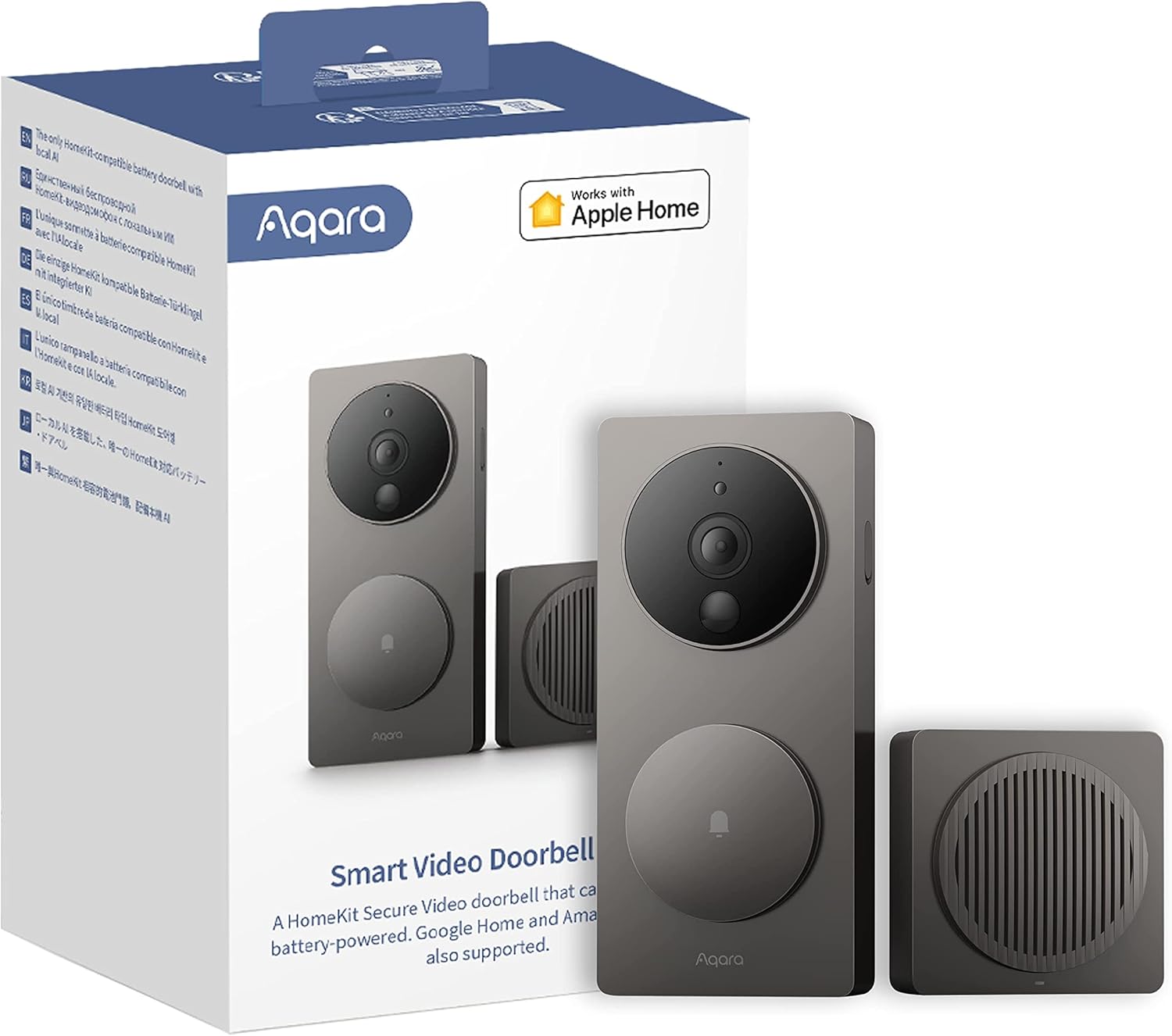
Out of the box, you get two main pieces: the doorbell unit that lives outside and the chime-repeater that plugs into a power outlet inside your house. The doorbell can run on 6 AA batteries (included) or be wired to existing doorbell wiring (12–24V AC or 8–24V DC). The chime acts as both the indoor ringer and a Wi‑Fi bridge/recorder with a microSD slot (up to 512 GB) for 24/7 recording when the doorbell is wired.
The camera itself is 1080p with a 162° field of view, night vision via infrared, and basic motion detection. On top of that, Aqara advertises local face recognition, so it can tell you if it thinks it’s a known person at the door. If you’re on Apple’s side, it supports HomeKit Secure Video, which means recordings can go straight to iCloud if you have the right iCloud plan. You can also use it with Alexa, Google Assistant, and IFTTT, but this clearly feels designed with Apple Home in mind first.
In theory, the flow is simple: someone walks up, the doorbell or motion sensor triggers, you get a notification on your phone or Apple device, and you can open live view and talk to them with two-way audio. The chime indoors rings with whatever sound you picked, and if you’ve set up automations (like turning on a porch light or triggering other Aqara sensors), those can fire too. That’s the promise, and when it behaves, it does exactly that.
In practice, it’s a bit more nuanced. The app and HomeKit integration are pretty solid, but you need to spend a bit of time tuning motion sensitivity and zones, otherwise you either miss events or get spammed. Also, you have to accept that this is 2.4 GHz Wi‑Fi only and pretty picky about walls and metal doors. If your front door is metal or you’ve got thick brick or concrete, you may need to move your router or the chime to get reliable connectivity. So the product is capable, but you don’t just plug it in and forget it; you’ll likely tweak placement and settings during the first week.
Pros
- Strong HomeKit Secure Video integration with no mandatory subscription
- Includes chime-repeater with microSD support for local and 24/7 recording
- Good 1080p image quality and fairly quick live view loading
Cons
- Can overheat and go offline in direct sun or hot climates
- Wi‑Fi can be unreliable through metal doors or thick concrete walls
- Overall reliability and motion tuning require some trial and error
Conclusion
Editor's rating
The Aqara Video Doorbell G4 is a solid option if you live in the Apple ecosystem and care about local storage and privacy. When it’s set up right, it offers good 1080p video, quick HomeKit integration, and handy features like local face recognition and flexible chimes. The included chime-repeater and microSD support make it possible to avoid ongoing subscription fees, which is a big plus compared to some competitors. Wired power with battery backup is the sweet spot, especially if you want 24/7 recording and don’t want to climb up to change batteries all the time.
But it’s not a perfect product. Heat sensitivity and Wi‑Fi limitations through metal doors or thick concrete can turn it into a headache if your house layout isn’t friendly. The overall reliability feels very dependent on placement and network quality. Some people will get a smooth experience, others will see it go offline or overheat more often than they like. If your entry is shaded and your Wi‑Fi is solid, you’ll probably be happy. If your door is in full sun, or your walls are heavy and your router is far, I’d think twice.
I’d recommend this mainly to Apple Home users who already pay for iCloud, want HomeKit Secure Video, and are comfortable tuning settings and maybe adjusting router/chime placement. If you’re on Alexa/Google only and just want something that works with minimal effort, or if you live in a very hot, sun-exposed location with a metal door, I’d look at alternatives. It’s a good doorbell in the right conditions, but there’s definitely better out there for pure reliability if you don’t need the HomeKit perks.