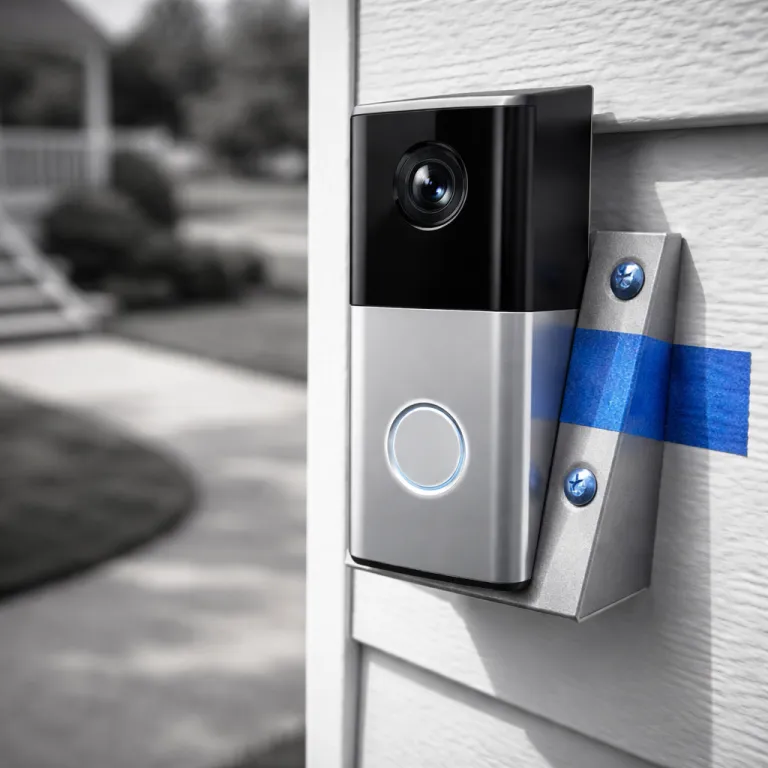
Why ring doorbell mounting height and angle matter more than specs
Most people mount a Ring video doorbell roughly at eye level and hope for the best. That casual installation choice often wastes the wide camera field of view and leaves blind spots where packages, faces, or suspicious motion should appear. When you treat the Ring doorbell mounting height and angle as a design decision, the video camera becomes a reliable home security tool rather than a fancy chime.
Ring recommends installing a video doorbell at about 120 centimetres from the ground (roughly 48 inches), which is lower than many traditional doorbell placements on older homes. That lower mount lets the camera lens capture both faces and the package zone while still keeping motion alerts focused on people rather than passing cars. If your existing doorbell is mounted too high, a simple wedge or Corner Kit mount will usually correct the angle without opening walls or redoing existing doorbell wiring.
Think of the video doorbell camera like a human eye that never blinks and never looks away. The vertical and horizontal view from each Ring doorbell model is different, so the ideal mounting height and angle will shift slightly between a Ring Battery Doorbell (2nd Gen) with a 155° horizontal by 90° vertical field of view and a Ring Video Doorbell Pro 2 with a 150° by 150° head-to-toe perspective. Your goal is to align that view so the video shows heads to shoes at about two to four metres from the door, while the Ring app filters out low value motion at the very edge of your property.
Dialling in the best height for faces, packages, and motion zones
Start by measuring from the finished ground level, not from a step or threshold, because a ten centimetre error can push the camera view too high. For most Ring video doorbell models, a mounting height between 110 and 125 centimetres balances facial detail, package visibility, and motion detection accuracy. If your porch is raised above the surrounding path, treat the lower walkway as the reference ground and adjust the mount slightly lower so the camera still captures visitors at a natural standing height.
Newer Ring devices with head-to-toe video, such as the Ring Video Doorbell Pro 2 (150° horizontal by 150° vertical field of view and 3D Motion Detection with radar up to roughly nine metres), reduce the need for an aggressive downward angle, since the taller field of view already covers the package zone. On a Ring Video Doorbell Pro 2 or Ring Video Doorbell Wired (about 155° by 90°), a clean vertical mount at around 120 centimetres will usually show visitors from head to shoes and still capture parcels. Older or narrower video doorbell models benefit from a slight tilt down so that the camera does not waste pixels on sky or the top of your door frame.
Watch a live video feed in the Ring app while someone stands where delivery drivers usually stop. If you see only a hat brim or forehead, the doorbell is mounted too high and the angle needs to come down a few degrees. If the frame is dominated by torsos and the ground while faces are cut off, the mount is too low and the camera should move up or use a different mounting bracket.

Using angled mounts for recessed doors, side entries, and pillars
Many family homes have recessed entries, side doors, or chunky pillars that block the camera view when a video doorbell is mounted flat. In those cases, the Ring doorbell mounting height and angle depend as much on horizontal rotation as on vertical tilt, because visitors may approach from a sharp side angle. A flat mount on the existing door frame will often show a beautiful view of a wall and almost no usable security footage.
Ring’s official Corner Kit (for example, the Ring Video Doorbell Corner Kit, part number 88°CORNER-KIT for some models) rotates the camera about fifteen degrees, which helps when the main path runs perpendicular to the door. If your entry is deeply recessed or your existing doorbell sits behind a brick return, stacking two corner mounts can swing the camera far enough that the video finally shows faces before people reach the mat. For doors set under arches or behind pillars, a Wedge Kit that tilts the camera outward and slightly down will usually restore a clear view of both the approach and the ground where packages land.
Side entries and garage doors often need a different strategy, because cars and street motion can flood the Ring app with alerts. Here, you can mount the Ring doorbell slightly lower, around 110 centimetres, and angle it toward the centre of the driveway while using motion zones to crop out the road. Test several mounting positions with painter’s tape before drilling, checking how the camera view changes as you shift the angle and height by just a few centimetres.
Balancing privacy, wifi reliability, and everyday usability
Getting the Ring doorbell mounting height and angle right is not only about what you see, but also about what you choose not to see. A camera mounted too high with a wide view can easily capture a neighbour’s windows or a shared walkway, which raises legitimate privacy concerns. Most Ring models let you draw privacy zones in the app so that parts of the video frame are permanently blacked out and excluded from motion detection.
Use those privacy tools generously, especially in dense housing where a single video doorbell might overlook several front gardens. After you settle on a mount height and angle, stand in your neighbour’s usual outdoor spaces and confirm that the camera does not record their private activities. If it does, adjust the mount slightly or tighten the privacy mask until the security benefit for your family no longer comes at the cost of someone else’s comfort.
Wifi reliability is the other invisible factor that can make a perfectly mounted camera feel useless. Steel doors, foil backed insulation, and thick brick walls between the router and the doorbell will weaken the wifi signal and cause delayed notifications or poor video quality. In apartments with a steel fire door, you may need to mount the Ring video doorbell slightly off centre on a wooden trim piece or pair it with a dedicated Ring Chime Pro or similar wifi extender placed within a few metres of the camera.
Avoiding common mounting mistakes and planning a full security layout
Certain mounting errors show up again and again when I visit homes with disappointing video doorbell footage. The most common is placing the Ring doorbell too high, which fills the frame with hats, hoods, and sky while missing faces and the ground where packages sit. The second is mounting too low, where children, pets, and every passing shadow trigger motion alerts until the family stops trusting the notifications.
Direct sun is another quiet enemy of video quality, especially on south facing doors without a porch roof. When the camera lens looks straight into low afternoon sun, the view washes out and the app recording shows silhouettes instead of useful detail. If you cannot change the door orientation, use a slight downward angle and consider a small shade or a deeper mount position that keeps the camera out of the harshest glare.
Think about the Ring video doorbell as one node in a wider home security layout that might include extra cameras, contact sensors, and an alarm system. A well placed front door camera often pairs with a side alley camera and smart door sensors, as explained in depth in this guide to how Ring door sensors strengthen smart home security at every door and window. When you plan the mounting height and angle for each device together, the overlapping views reduce blind spots and make the whole system feel like a single, calm layer of protection rather than a noisy collection of gadgets.

FAQ
What is the best mounting height for a Ring video doorbell ?
For most models, a mounting height around 120 centimetres from the ground works well. That level lets the camera capture faces clearly while still showing the package area near the threshold. If your porch is significantly raised or sunken, adjust the mount slightly so the video frame shows visitors from head to shoes at typical standing distance.
Do I need an angled mount for my Ring doorbell ?
You need an angled mount when a flat installation does not give a clear view of the approach path. Recessed doors, side entries, and doors behind brick returns often benefit from a Corner Kit or Wedge Kit that shifts the camera angle by fifteen degrees or more. Test the view in the app before drilling, and add or remove angle until the motion zones cover people rather than walls or empty pavement.
How can I stop my Ring doorbell from recording my neighbour’s property ?
Use the privacy zone feature in the Ring app to block out parts of the camera view that include neighbouring windows, doors, or gardens. After drawing those zones, the video doorbell will ignore motion and recording in those masked areas. If you still see too much of a shared space, slightly adjust the mounting height or angle to narrow the field of view.
What if my existing doorbell wiring is much higher than 120 centimetres ?
If the existing doorbell wiring sits too high, you can often reuse it while shifting the Ring device down with a short surface mounted cable run or conduit. Another option is to keep the wiring where it is and use a strong wedge mount to tilt the camera sharply downward. When neither looks clean, many people choose a battery powered Ring model and mount it at the ideal height while leaving the old wired doorbell in place.
Why does my Ring video look washed out or too dark at certain times ?
Harsh direct sunlight, deep shade, or bright backlighting can all reduce video quality even when the camera is technically working. If the door faces strong afternoon sun, a slight downward angle or a small overhang can keep glare out of the lens. In very dark porches, consider adding a low wattage light near the door so the camera has enough illumination to capture detail without relying only on infrared night vision.