The shared driveway problem with Ring doorbells
A Ring doorbell on a shared driveway often feels hyperactive. Every time your neighbors walk the dog, reverse their car, or unload groceries, the doorbell camera can trigger motion detection and send a fresh alert. After a few days of this, many users simply mute alerts, which quietly defeats the whole point of smart doorbells on a busy property.
The core challenge with a ring doorbell shared driveway motion zone neighbor setup is that the camera usually faces both your entrance and the shared lane. The Ring device does not know which motion belongs to your visitor and which belongs to a neighbor just passing through, so the app will happily send a notification for both. That constant stream of alerts can make people ignore the ring app, which is risky if a real crime or suspicious activity happens at your own door.
On narrow lots or townhouses, the problem is worse because the doorbell camera often sees several front doors and overlapping properties. In that scenario, smart doorbells can feel like shared surveillance tools rather than personal security devices, especially when neighbors do not realize how much of their daily routine is being recorded. Managing this tension between privacy, security, and convenience is the starting point for any thoughtful motion zones strategy on a shared driveway.
Motion zone surgery in the Ring app
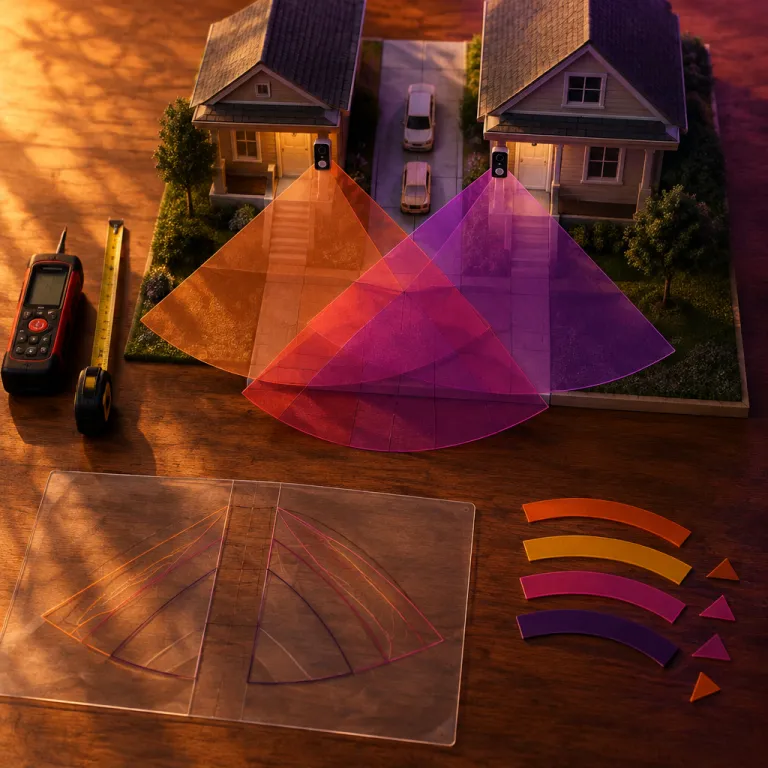
The most effective fix for a ring doorbell shared driveway motion zone neighbor conflict is careful redrawing of motion zones. In the Ring app, you can set custom zones that hug your front step, porch, and immediate property line while deliberately excluding the shared strip where neighbors walk or drive. Think of these zones as a digital masking tape that tells the Ring device where to pay attention and where to ignore motion entirely.
Start by opening the ring app on your phone tablet, then open Ring settings for motion detection and choose the option to edit motion zones. Draw one tight zone that covers the area where visitors actually stand to press the doorbell, then add a second, slightly wider zone that covers the path they use to approach your door. Avoid stretching any zones across the full width of the shared driveway, because that will pull neighbor traffic back into your alerts and notifications.
On some properties, the best approach is to create several small zones instead of one large rectangle. This lets users carve around a neighbor’s parking space or walkway, which reduces unnecessary alerts while still letting you receive notification when someone steps onto your own property. For more context on how Ring is evolving from a simple doorbell camera into a broader community safety platform, you can read this analysis of Ring’s fire watch and community safety features on a specialist Ring security review site.
People-only motion detection and sensitivity balancing
Once motion zones are under control, the next lever is people-only motion detection. When enabled in the Ring app, this feature tells the doorbell camera and any paired indoor cam to focus on human shapes instead of reacting to every car, cat, or gust of wind. On a ring doorbell shared driveway motion zone neighbor layout, that single change can cut false alerts dramatically without sacrificing real security.
In the same motion detection menu where you set zones, you will find a sensitivity slider that controls how easily the Ring device triggers. Start in the middle, then adjust in small steps over several days, because the right level will vary depending on how close the shared driveway is and how often neighbors pass by. If you live on a busy street, you may need lower sensitivity so that only motion inside your carefully drawn zones generates an alert, while quieter cul-de-sacs can tolerate slightly higher sensitivity for earlier warnings.
Remember that smart doorbells are not one-size-fits-all, and the best settings for your property may differ from what online forums recommend. Some users pair a doorbell camera with a separate Ring security indoor cam facing the interior hallway, which gives a second layer of verification without adding more outdoor motion zones. For a deeper look at how Ring’s newer outdoor cameras handle motion and alerts in backyards and side yards, a detailed review of the second-generation Ring outdoor camera explains what the higher resolution brings to everyday home security.
Angling the device and protecting neighbor privacy
Software settings can only do so much if the doorbell camera is pointed straight down a shared driveway. A simple wedge mount or corner kit can tilt the Ring device a few degrees toward your own door, which instantly removes large parts of your neighbor’s property from the frame. This physical adjustment often reduces both motion alerts and the risk of an unintended invasion of privacy affecting people who never chose to install Ring doorbells.
When you adjust the angle, use the live view in the ring app on your phone tablet to check exactly what the camera sees. Aim so that your doorway and immediate steps are centered, while cars parked in the shared driveway and your neighbor’s windows sit at the very edge or outside the frame entirely. This careful framing supports privacy security for everyone while still letting you receive notification when someone approaches your entrance or lingers near packages.
It is also worth having a direct conversation with any neighbor whose daily routine appears in your recordings. Explain what the Ring doorbell can see, how you have set motion zones to minimize unnecessary footage, and how long video clips are stored in your Ring security account. For a thoughtful discussion of how neighborhood use of Ring cameras can blur the line between helpful monitoring and constant surveillance, a case study on Ring search parties for lost dogs raises important questions about community safety and personal privacy.
Notifications, audio settings, and multi-device setups
Even with a well-tuned ring doorbell shared driveway motion zone neighbor configuration, you still need to manage how alerts reach you. In the Ring app, you can set different notification tones and volumes so that motion alerts sound softer than doorbell presses, which keeps your phone tablet from feeling like a siren every time someone walks past. Some users also route alerts to a secondary device, such as a tablet in the kitchen, so that the primary phone stays quieter during work hours.
Pay attention to audio settings on both the doorbell and any linked indoor cam, because two-way audio can pick up conversations from neighbors standing in the shared driveway. If you are concerned about privacy, reduce microphone sensitivity where possible and avoid leaving live view open longer than necessary, since that can feel like open Ring surveillance rather than targeted home protection. These small choices help balance crime deterrence with respect for the people who share your space and may not want every chat or argument captured by a camera.
Many frequently asked and quietly asked questions about Ring doorbells revolve around how much control users really have over data and recordings. The exact options will vary depending on your specific Ring device model and subscription plan, but the core tools in the app needed for privacy security are consistent across most doorbells and cameras. If you ever feel unsure, the help section inside the Ring app organizes the most common asked questions so you can adjust settings before tensions with neighbors escalate.
FAQ
How do I stop my Ring doorbell from alerting every time my neighbor uses the shared driveway ?
Open the Ring app, go to motion detection settings, and redraw motion zones so they cover only your steps, porch, and the path to your door. Lower the sensitivity slider one step at a time until cars and pedestrians in the shared lane no longer trigger an alert. If needed, add a wedge or corner kit to angle the doorbell camera away from the center of the driveway and more toward your own property.
Can my Ring doorbell record my neighbors legally on a shared driveway ?
On many shared properties, the law allows cameras to record areas that are visible from your own entrance, but expectations of privacy still matter. To reduce the risk of an invasion of privacy complaint, use motion zones to avoid filming windows, private seating areas, or parts of the driveway that clearly belong to your neighbor. A brief, respectful conversation explaining what your Ring device records and how long clips are stored often prevents misunderstandings.
What Ring settings work best when several doorbells face the same shared driveway ?
When multiple Ring doorbells watch the same shared space, coordination between neighbors helps a lot. Each household should tighten motion zones around its own doorway and enable people-only motion detection so that passing cars and pets do not trigger every device. Staggering sensitivity levels and angling each camera slightly differently can also reduce redundant alerts while still providing strong Ring security coverage for the whole area.
Do I need the Ring app on every phone and tablet in my home ?
You only need the Ring app on the phone tablet or other devices where you want to receive notification and manage settings. Many households install the app on one primary phone, then use shared access or a linked tablet as a secondary screen for live view and alerts. The number of devices you can connect will vary depending on your Ring subscription, but the core features remain the same across phones and tablets.
Should I add an indoor cam if I already have a Ring doorbell on a shared driveway ?
An indoor cam can complement a Ring doorbell on a shared driveway by confirming whether someone who triggered motion outside actually entered your home. Placing a small camera in the hallway or entryway lets you keep outdoor motion zones tighter, because you know any real visitor will appear indoors a few seconds later. This two-layer setup often reduces outdoor alerts while still giving clear evidence if a crime or break-in occurs.
Sources
Electronic Frontier Foundation ; Consumer Reports ; Wirecutter.