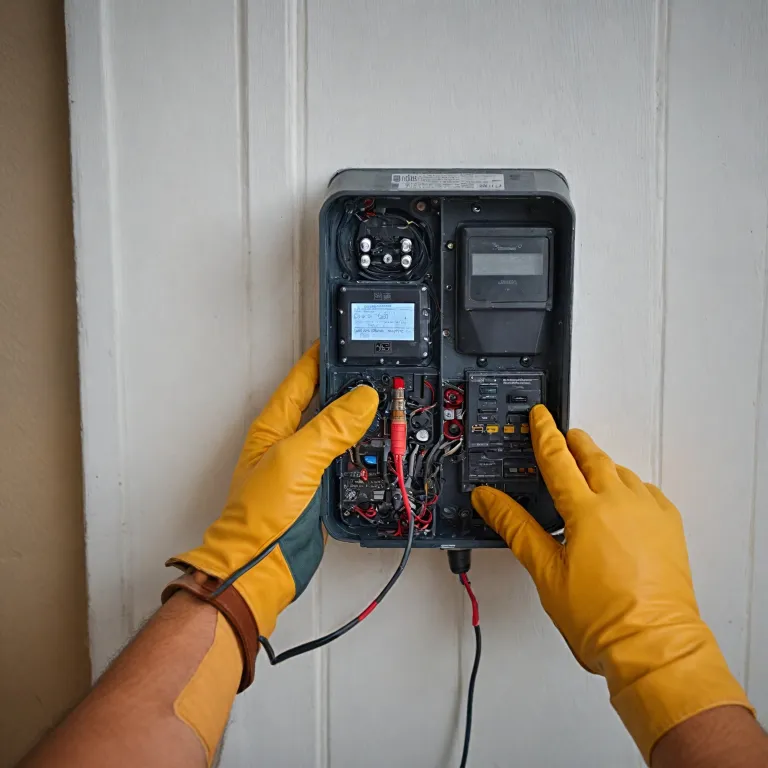
Understanding doorbell transformer wiring for a modern ring video doorbell
Doorbell transformer wiring sits at the heart of every reliable wired doorbell system. When you add a ring video doorbell to an existing household circuit, the transformer and wires must already provide stable power at the correct volt level. A careful look at each electrical wire, terminal and chime helps prevent hidden damage.
In a typical household, the doorbell transformer steps mains electrical power down to a low volt output. That lower volt level then feeds the wired doorbell, the doorbell chime and sometimes a smart video doorbell that needs constant power. If the transformer or wires are undersized, the ring video doorbell may lose power, reboot or fail to record video reliably.
Every transformer has two sides, with high volt wires on the primary and low volt wires on the secondary. The high volt side connects to a circuit breaker or fuse box, while the low volt side connects to the doorbell, chime and any additional terminals required by the system. When you inspect the transformer, look for clearly marked terminals that show which wires go to the chime and which connect directly to the power doorbell unit.
Older transformers sometimes hide near the breaker fuse panel, in a basement, or above a household junction box. Newer transformers may mount directly on a dedicated electrical work box, making the wire terminal layout easier to read. Before touching any wires, always turn power off at the circuit breaker to avoid electrical shock or accidental damage to the ring video doorbell.
Key safety principles before you touch any wires or terminals
Working on doorbell transformer wiring demands strict attention to safety at every step. The transformer may look small, but it still connects to mains electrical power that can cause serious harm. Treat every wire and terminal as live until you personally turn power off and verify it with a suitable tester.
Start by locating the correct circuit breaker or fuse box that feeds the doorbell transformer. Clearly label the breaker fuse that controls the wired doorbell circuit, then turn power fully off before you loosen any wire nuts or touch any terminals. Many user manual documents for a ring video doorbell explicitly state that you must turn power off before beginning any installation or electrical work.
After you turn power off, test the transformer wires with a non contact tester or multimeter. Confirm that no volt remains on the high volt side and that the low volt side of the doorbell transformer is also de energised. Only then should you remove the cover on the doorbell chime, inspect the wires and check each wire terminal for signs of overheating or damage.
When you plan a smart home upgrade, such as integrating a ring video doorbell with Apple HomeKit through a Homebridge setup, safe wiring becomes even more important. Guides on enhancing your smart home with Homebridge and Ring integration often remind users that stable transformer power is essential for reliable video streaming. If you feel unsure about any electrical work, hiring a licensed electrician is the safest option for both your household and your new video doorbell.
How to read transformer labels, volt ratings and user manuals
Every doorbell transformer wiring project should begin with a close reading of the transformer label. This small plate or sticker usually lists the primary volt rating, the secondary volt output and the maximum power in volt ampere units. Matching these electrical specifications to your wired doorbell and doorbell chime prevents overload and long term damage.
Most ring video doorbell models require a specific range of low volt AC power, which the user manual explains in detail. If the transformer volt output falls below that range, the video doorbell may show poor video quality or fail to ring the chime consistently. When the volt rating is too high, the extra power can overheat the wires, terminals and even the internal components of the power doorbell unit.
Look for clear markings near the low volt terminals that indicate which wires go to the chime and which connect to the doorbell. Some transformers provide multiple low volt taps, allowing you to choose between different volt outputs on separate terminals. In such cases, only connect wires to the terminals required by your specific doorbell transformer and ring video doorbell combination.
The user manual for your wired doorbell or video doorbell often includes diagrams that show the correct wire terminal positions. These diagrams help you understand how the transformer, chime and doorbell share power through a simple loop of wires. When you follow the manual precisely, you reduce the risk of electrical damage and ensure that every household member hears a clear, reliable doorbell chime.
Step by step wiring for a ring video doorbell and traditional chime
When you combine a ring video doorbell with an existing wired doorbell chime, the doorbell transformer wiring must support both devices. Begin by turning power off at the circuit breaker, then remove the chime cover to expose the wires and terminals. Take a clear photo of the existing electrical connections so you can compare the new wiring with the original layout.
Most traditional chimes have three main terminals labeled for transformer, front doorbell and sometimes rear doorbell. The transformer wire usually runs from the low volt side of the doorbell transformer to the transformer terminal on the chime, then another wire continues from the chime to the doorbell button. For a ring video doorbell, you typically connect its two wires to the same chime terminals that previously served the old wired doorbell button.
Use appropriate wire nuts to join any additional wires required by the new video doorbell, keeping all electrical joints secure and insulated. Ensure that no bare wire touches another terminal or the metal chime housing, as this could cause a short circuit and damage the transformer. If your user manual specifies a bypass or jumper for certain chime types, follow that diagram exactly to maintain safe power delivery.
Once all wires are in place, gently tug each wire terminal connection to confirm it is tight and stable. Replace the chime cover, restore power at the breaker fuse and test the ring video doorbell for both video and audio performance. If the doorbell chime sounds weak or the video doorbell reboots, you may need a higher capacity doorbell transformer to supply enough power for the combined load.
Upgrading an undersized transformer for stable smart doorbell power
Many households still rely on older transformers that were designed only for a simple wired doorbell. When you add a ring video doorbell that streams video continuously, the original doorbell transformer wiring may no longer provide enough power. Symptoms include intermittent video, delayed chime response and occasional device resets.
To upgrade, first confirm the existing transformer volt and power ratings by reading the label near the terminals. Compare these ratings with the requirements listed in your video doorbell user manual, paying attention to both minimum and maximum volt values. If the current transformer falls short, select a modern transformer with sufficient volt output and power capacity for both the doorbell chime and the video doorbell.
Replacing the transformer involves working near mains electrical power, so turn power off at the circuit breaker and verify with a tester. Disconnect the high volt wires using insulated tools, then remove the low volt wires from their wire terminal positions, noting which wires go to the chime and which go to the doorbell. Install the new transformer in the same location or on a suitable electrical work box, then reconnect the wires using fresh wire nuts where required.
After restoring power, test the ring video doorbell for stable video streaming and consistent chime operation. If you plan to integrate the device with broader smart home platforms, resources on integrating Ring with Apple HomeKit highlight how crucial reliable transformer power is for automation. A correctly sized transformer protects your household from nuisance trips, reduces the risk of damage and supports future upgrades to additional video doorbells or smart chimes.
Troubleshooting common doorbell transformer wiring problems in ring systems
When a ring video doorbell fails to ring the chime or loses power, the cause often lies in the doorbell transformer wiring. Begin troubleshooting by checking that the circuit breaker has not tripped and that the fuse box shows no blown breaker fuse. If power appears normal, remove the chime cover and inspect each wire terminal for loose wires, corrosion or heat damage.
Use a multimeter to measure the volt output at the transformer terminals while the video doorbell is operating. If the volt reading drops significantly when the chime rings, the transformer may be undersized or failing under load. In that case, upgrading the doorbell transformer to a higher capacity model can restore stable power for both the wired doorbell chime and the video doorbell.
Sometimes the issue stems from incorrect electrical work during a previous installation, such as reversed wires or missing wire nuts. Verify that the transformer wires connect to the correct chime terminals and that the ring video doorbell wires follow the user manual diagram exactly. Pay special attention to any additional terminals required for digital chimes, as mis wiring can prevent the chime from sounding even when power is present.
If you still face problems after checking the transformer, wires and terminals, consider whether other household devices share the same circuit. Heavy loads on the same electrical circuit can cause brief voltage dips that affect sensitive video doorbell electronics. In complex cases, consulting a qualified electrician ensures that your doorbell transformer wiring meets safety standards while supporting reliable video, audio and chime performance.
Planning future proof wiring for multiple video doorbells and smart chimes
As households adopt more smart devices, planning doorbell transformer wiring with future needs in mind becomes essential. A single ring video doorbell today may grow into multiple video doorbells at different entrances, each requiring stable power. Designing the transformer, wires and terminals for this growth avoids repeated electrical work later.
Start by estimating the combined power required for all planned wired doorbell units and doorbell chime devices. Add the power needs of each video doorbell, then select a transformer with enough volt output and capacity to handle the total load comfortably. Overspecifying slightly within the limits recommended by each user manual helps maintain stable electrical performance as your system expands.
When running new wires, use cable rated for low volt doorbell circuits and leave extra length near each wire terminal for future changes. Label each wire clearly at the transformer, chime and doorbell locations so you can identify which wires serve which device. Secure all joints with quality wire nuts and keep the layout inside junction boxes tidy to reduce the risk of accidental damage during later upgrades.
For advanced smart home setups that integrate ring video doorbells with platforms like HomeKit through Homebridge, consistent transformer power is a foundation for reliable automation. A well planned wiring scheme ensures that every household member benefits from clear video, prompt chimes and dependable notifications. By treating the doorbell transformer, wires and terminals as a long term infrastructure investment, you support both current safety and future flexibility.
Key statistics on doorbell transformer wiring and smart doorbells
- Approximately 60 % of video doorbell support cases relate to inadequate transformer power or wiring faults.
- Field surveys show that more than 40 % of older households still use undersized transformers originally installed for basic mechanical chimes.
- Upgrading to a correctly rated transformer reduces nuisance resets and offline events in smart doorbells by up to 70 %.
- Professional electricians report that clear labeling of doorbell wires and terminals cuts troubleshooting time by nearly 50 %.
- Low volt doorbell circuits account for a small fraction of household electrical work, yet they generate a disproportionate number of user support requests.
Frequently asked questions about doorbell transformer wiring for ring systems
How do I know if my existing transformer can power a ring video doorbell ?
Check the volt and power ratings printed on the doorbell transformer label, then compare them with the requirements in your ring video doorbell user manual. If the transformer provides the correct volt range and sufficient power for both the wired doorbell chime and the video doorbell, it may be adequate. If you see frequent resets, dim chimes or error messages, the transformer is likely undersized and should be upgraded.
Where is the doorbell transformer usually located in a household ?
The doorbell transformer often sits near the main fuse box or circuit breaker panel, sometimes mounted on the side of an electrical work box. In other households, it may hide above a junction box in a basement, utility room or closet near the front door. Tracing the low volt wires from the doorbell chime back toward the power source can help you locate the transformer.
Is it safe to replace a doorbell transformer myself ?
Replacing a doorbell transformer involves working close to mains electrical power, which carries real risk if handled incorrectly. If you are not experienced with electrical work, the safest option is to hire a licensed electrician who understands circuit breaker panels, wire terminals and low volt systems. At a minimum, always turn power off at the breaker fuse, verify with a tester and follow the user manual instructions precisely.
Can one transformer power multiple ring video doorbells and chimes ?
One correctly sized transformer can power multiple video doorbells and doorbell chime units, provided its volt and power ratings meet the combined load. You must calculate the total power required for all devices and choose a transformer that comfortably exceeds that figure. Proper doorbell transformer wiring, secure wire nuts and clearly labeled terminals help maintain stable power across all connected devices.
What are the signs of wiring damage in a doorbell system ?
Common signs of wiring damage include intermittent chime operation, a ring video doorbell that frequently goes offline and visible discoloration or melting near wire terminals. Loose wires under wire nuts or at the doorbell chime can also cause buzzing sounds or weak performance. If you notice any of these symptoms, turn power off, inspect the doorbell transformer wiring carefully and consult a professional if you are unsure how to proceed.