
Summary
Editor's rating
Value: worth the price or overkill?
Design: small, quiet, and easy to hide
Durability and reliability over time
Performance: fast automations and stable 24/7 use
What the Home Assistant Green actually is (and what it isn’t)
Effectiveness: does it actually simplify the smart home mess?
Pros
- Fast, reliable local automations with no dependence on vendor clouds
- Official, preinstalled Home Assistant hardware that’s easy to get running
- Small, silent, low-power box that can run 24/7 without fuss
Cons
- No built-in Zigbee/Z-Wave/Thread radios, so extra USB dongles are almost mandatory
- Learning curve for beginners; not as simple as Alexa/Google routines
- Only two USB ports, so multi-radio setups usually need a powered USB hub

Specifications
View full product page →| Brand | Nabu Casa |
A smart home hub that actually feels like it’s yours
I’ve been running the Home Assistant Green for a bit over three weeks now as my main smart home hub. Before that I was juggling Google Home, a couple of Alexa speakers, a Hue bridge, and a random Zigbee hub from a bulb brand I don’t even want to remember. In practice, it meant five apps on my phone and half my automations breaking every few months when some cloud service changed its mind.
What pushed me to try this box was the idea of having everything local and in one place. No cloud rules that randomly stop working, and no "sorry, this device is no longer supported" pop-ups. I plugged the Green into my router, went through the web setup, and within the first evening I had my lights, some sensors, and my TV in the same dashboard. It wasn’t magic, but it was already more coherent than what I had before.
I’m not going to pretend it’s as brainless as adding a new bulb in the Alexa app. You still have to poke around a bit, read some tooltips, and accept that Home Assistant is more nerdy than the usual voice assistant stuff. But the box itself, the Green, makes the first step much easier than doing a DIY install on a Raspberry Pi or an old mini PC.
Overall, my feeling so far: it’s a pretty solid hub for people who are already annoyed with brand silos. It’s not perfect, there’s a learning curve, and you’ll probably end up buying at least one USB dongle, but in daily use it does what matters: it runs quietly, it’s fast, and my automations finally feel under my control instead of being at the mercy of some cloud outage.
Value: worth the price or overkill?
Let’s talk money, because this isn’t the cheapest way to dip a toe into smart homes. You can get a basic Echo or Nest device for much less, and they’ll give you some routines and voice control. The difference is that the Home Assistant Green is meant to be the long-term brain of your setup, not just a speaker with a few tricks. If you factor that in, the price starts to make more sense, but it’s still not pocket change, especially once you add the extra USB dongles you’ll likely need.
In my case, I bought a Zigbee/Thread stick and a Z-Wave stick, each around 20–25 bucks, plus a small powered USB hub because there are only two USB ports on the Green. So the total bill creeps up. On the other hand, I no longer need separate vendor hubs for some brands, and I’m not locked into one ecosystem. Over time, that flexibility has real value: I can buy whatever sensors or bulbs are a good deal, not just what works with brand X’s app.
Compared to rolling your own Home Assistant box on a Raspberry Pi or an old mini PC, the Green is clearly more expensive than the absolute DIY minimum. But you’re paying for convenience: it comes preinstalled, tuned, and supported by the Home Assistant team. No messing with SD card images, less risk of flaky power, and a compact, low-power box that’s quiet and purpose-built. If your time is worth anything and you’re not into tinkering with hardware, that premium is reasonable.
So is it good value? For someone who just wants a couple of smart bulbs and a voice assistant, honestly, no—you’re better off sticking to a cheap Echo or Nest. For someone who already has a mix of brands, is annoyed by cloud outages, and wants more serious automations, I’d say the Home Assistant Green offers solid value. It’s not cheap, but it gives you a stable platform that you can grow with instead of hitting a wall every time a vendor changes their mind.
Design: small, quiet, and easy to hide
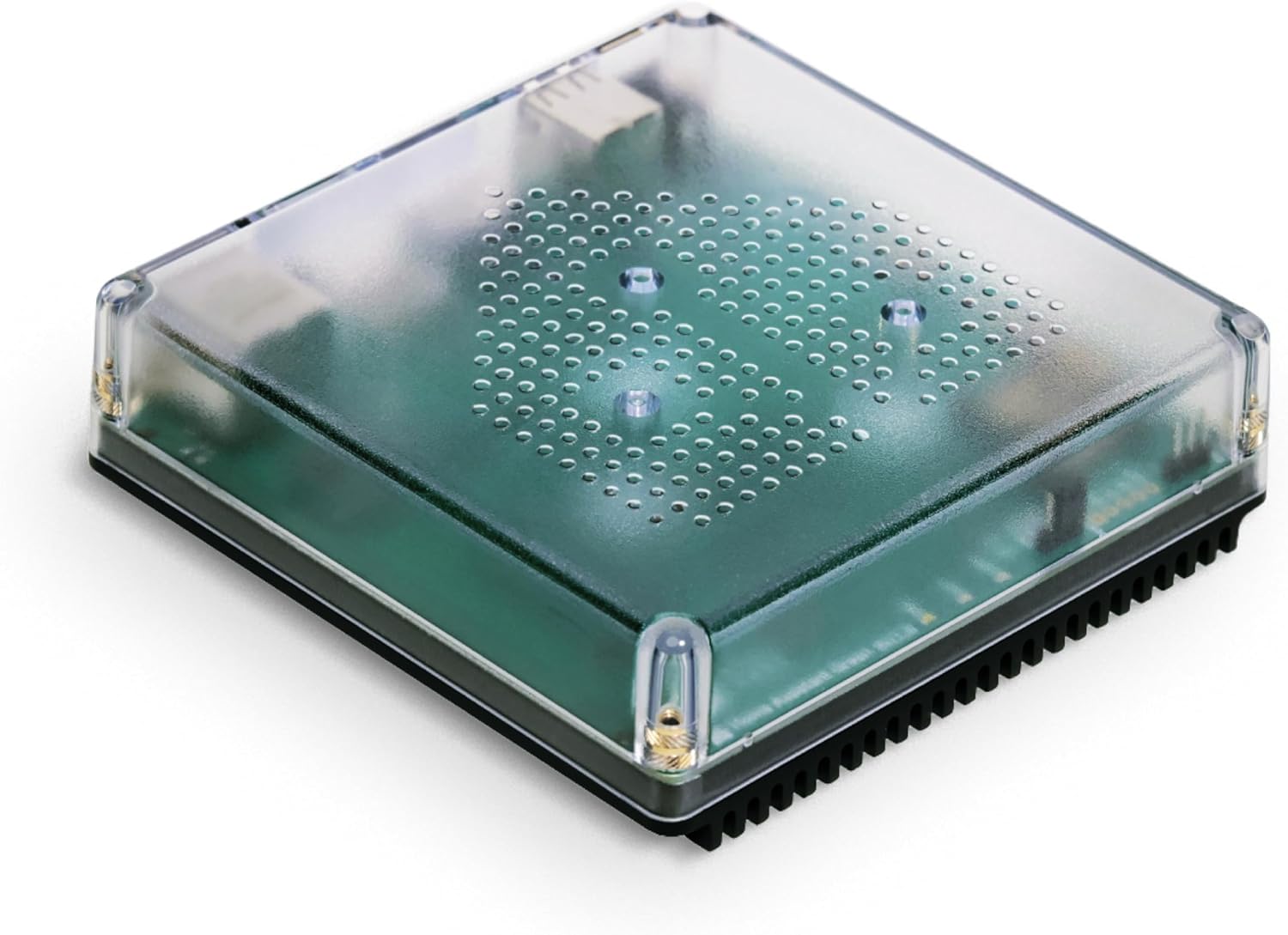
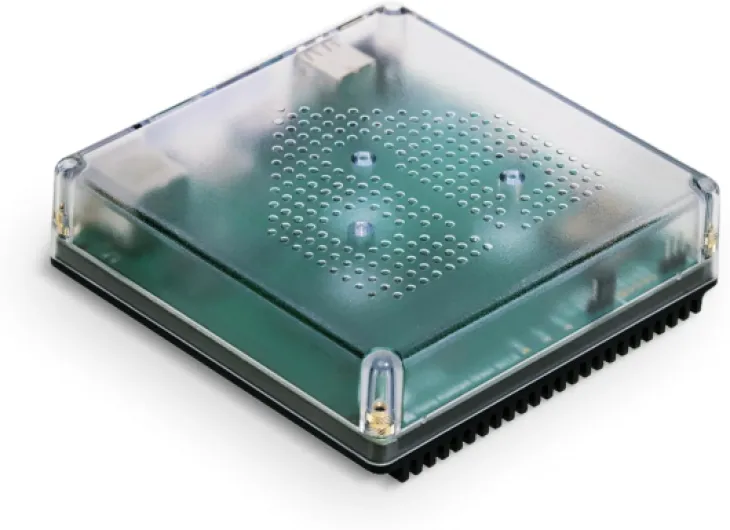
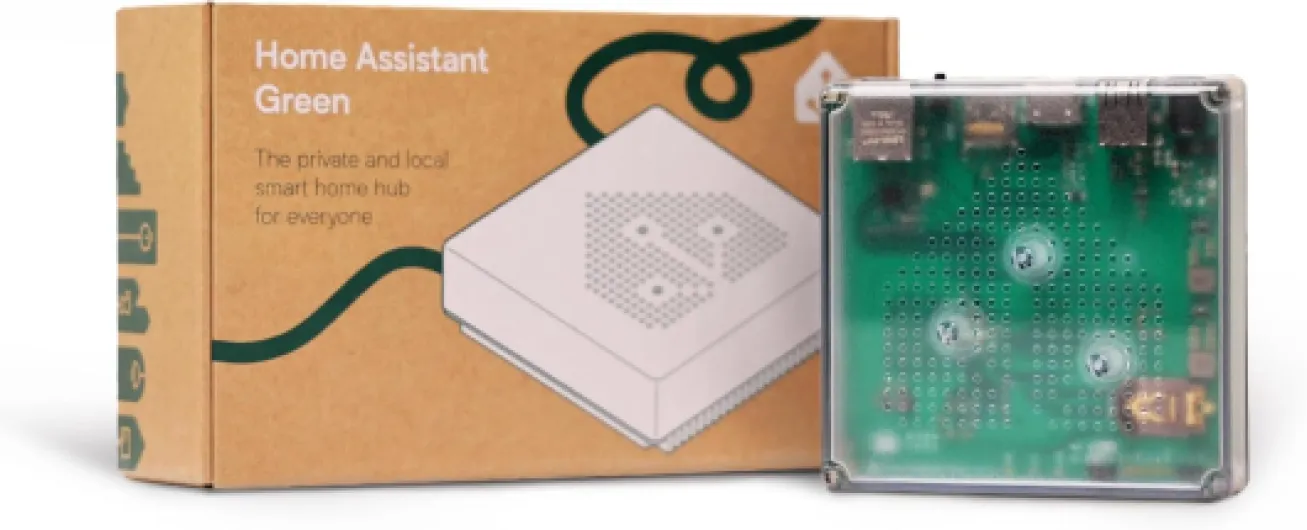
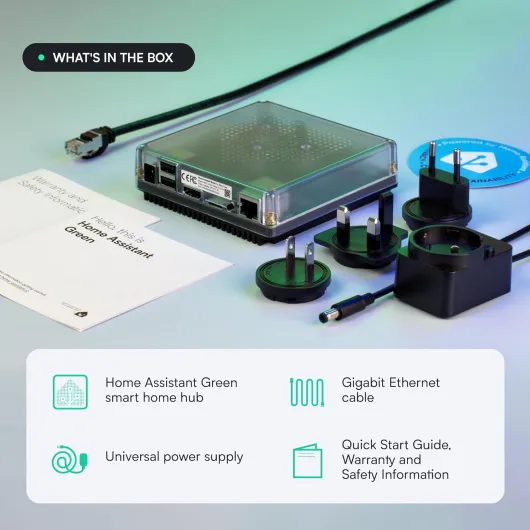
Physically, the Home Assistant Green is roughly a small square puck, about 4.4 x 4.4 inches and just over an inch tall. It weighs next to nothing (around 12 ounces) and has no fan, so it’s completely silent. I tossed it on the shelf next to my router and honestly I forget it’s there most of the time. There’s no ugly antenna farm sticking out of it because, as mentioned, the radios come from USB dongles if you add them.
The case feels like solid plastic with a simple, clean look. Nothing fancy, no shiny chrome or weird RGB lights trying too hard. There’s a status LED that gives you some basic feedback, but it’s not blinding in a dark room. For a living room or an office, it blends in fine. If you’re picky about cable management, all the ports being on one side makes it easier to route Ethernet and power together. I’ve had way messier setups with mini PCs and random hubs before; this is more compact.
Heat-wise, I was a bit worried at first since it’s fanless, but after running 24/7 with several add-ons and a few integrations, the case just gets mildly warm, nothing alarming. It’s pulling only a couple of watts, so it’s not going to roast anything around it. I’ve stacked a small powered USB hub under it to hold my Zigbee and Z-Wave sticks, and even then everything stays at reasonable temperature.
If I have one small gripe, it’s that with multiple USB dongles plugged in, the clean look goes away fast. Once you add a powered USB hub and a couple of antenna sticks, you end up with a little spider of cables and antennas near your router. Not the end of the world, but if you were dreaming of a single neat box, you need to be realistic. Still, the core design of the Green itself is simple, practical, and clearly intended to disappear in a corner and just run.
Durability and reliability over time
I obviously haven’t had this thing for years, but based on a few weeks of 24/7 use and what I know from running Home Assistant on other hardware, the Green feels built for the long haul. There are no moving parts: no fan, no spinning drive. Storage is solid-state, and the power draw is low, which usually means less heat stress on components. The case has stayed only mildly warm even during long configuration sessions and backups, which is a good sign for longevity.
From a software point of view, durability is really about how it handles updates and backups. Home Assistant gets frequent updates, and on this box, applying them has been straightforward. I’ve done several core updates and a couple of add-on updates, and the system came back up without weird side effects. The built-in backup tools also make it easy to snapshot the whole setup before doing anything risky. I stored a couple of backups off-device, and restoring one as a test worked fine, which is reassuring if the hardware ever fails or I mess something up.
One thing I like is that the hardware is official from Nabu Casa, the same team behind Home Assistant. That doesn’t magically guarantee eternal support, but it’s better than some random third-party box that might get abandoned. They have a clear interest in keeping this device relevant and updated. Also, because it’s just Home Assistant under the hood, if the box ever dies, I can move my config to another machine without being locked into proprietary hardware.
My only medium-term concern is the 32 GB storage. For a typical user, that’s plenty, but if you log lots of sensor data and keep long history, you might want to tune retention or offload the database at some point. That’s more of a Home Assistant tuning topic than a Green-specific flaw, though. Overall, for something that sits in a corner and runs non-stop, the combination of fanless design, low power use, and official support makes me reasonably confident it’ll hold up well over the years.
Performance: fast automations and stable 24/7 use
In daily use, the performance has been the strongest part for me. With a quad-core CPU and 4 GB of RAM, this little box handles my setup without feeling sluggish. I’m running around 80 devices right now: a mix of Wi‑Fi plugs, Zigbee bulbs and sensors (through a USB stick), a couple of cameras, plus integrations for Alexa, Google, and a media player. Dashboards load quickly in the browser, and changing a light or a scene from the interface feels almost instant.
The main difference compared to my old cloud-based automations is speed and consistency. For example, I have a motion sensor in the hallway that turns on a light strip to 20% at night. With the old setup going through the cloud, there was often a 1–2 second delay, sometimes more. With Home Assistant Green running everything locally, the light kicks in so fast that you barely notice the delay. Same for my “movie mode” automation that dims certain lights and pauses notifications when the TV starts playing: it triggers reliably every time, without the random hiccups I used to get with Google Routines.
Stability-wise, I’ve had the box running non-stop since I set it up. No random reboots, no freezes. I’ve done a couple of reboots myself after big updates or after adding new USB dongles, but that’s it. Memory usage stays in a comfortable range, and I haven’t seen it grind to a halt even with a handful of add-ons (like HACS and a couple of integrations that run background services). Compared to a Raspberry Pi 3 I used in the past, this is clearly smoother and less fragile.
Could you get more raw power from a mini PC or a NUC? Sure. But for a typical home with a bunch of lights, sensors, and a few cameras, this thing has more than enough muscle. If you start going crazy with tons of heavy add-ons, databases, and video stuff, you might hit the limits, but for a normal smart home, the performance is frankly solid. For me, the big win is that response times feel local, not cloud-ish, and that alone changes how “smart” the house feels.
What the Home Assistant Green actually is (and what it isn’t)
On paper, the Home Assistant Green is a small box with a quad-core processor, 4 GB of RAM, and 32 GB of storage, running Home Assistant out of the box. In practice, think of it as a little dedicated computer whose only job is to manage your smart home. You plug in power, plug in Ethernet, wait a few minutes, and then you access it from a browser on your phone or laptop. No need to install an OS, no SD card juggling, no imaging tools.
The big thing to understand: it doesn’t have built-in Zigbee, Z-Wave, or Thread. Out of the box, it talks over your network. That means it can see Wi‑Fi devices, IP cameras, cloud-connected stuff (if there’s an integration), and some local bridges like Hue or Lutron. If you want it to talk directly to Zigbee or Z-Wave sensors and bulbs, you need USB dongles. In my case, I added a Zigbee/Thread stick and later a Z-Wave one, which meant also adding a powered USB hub because there are only two USB ports.
Compared to a DIY Home Assistant setup on a Raspberry Pi, the Green saves you time and headaches. You don’t worry about SD card wear, you don’t mess with images, you don’t wonder if your power supply is stable enough. Compared to something like a Google Nest Hub or Echo, this is less polished for casual users but far more flexible. There’s no glossy app that hides everything—here you see entities, integrations, automations. It’s a bit more barebones visually, but you get way more control.
So if you expect a simple “plug it in and it magically sees every device instantly” experience, you’ll probably be a bit surprised. It’s more like: plug it in, then spend an evening adding integrations, linking accounts where needed, and slowly pulling all your devices into one place. Once that’s done, it feels like a proper central brain for the house, not just another voice assistant box that only talks nicely with its own brand and a few partners.
Effectiveness: does it actually simplify the smart home mess?
For me, the real test was simple: can this box let my random mix of brands work together in a sane way? In that sense, the Home Assistant Green does the job very well. I’ve got Philips Hue, some cheap Zigbee sensors from AliExpress, a couple of Wi‑Fi plugs, a robot vacuum, and a video doorbell that stopped playing nice with Alexa a while back. With the right integrations and a bit of tweaking, I managed to pull all of them into one interface and build automations that just weren’t possible before.
Concrete example: I now use a Lutron motion sensor (through its own bridge) to control non-Lutron bulbs and a smart plug from another brand. Before, they lived in separate apps and couldn’t talk to each other. Another one: my doorbell’s motion events are used to send announcements to Sonos speakers and Echo devices, something that broke when the vendor changed their Alexa skill. Home Assistant Green sits in the middle, listens to the doorbell, and triggers the announcements locally. It feels like you’re finally wiring all these gadgets together instead of begging each vendor to add support for the others.
Where it’s less “plug and play” is in the initial setup and the more advanced automations. Basic stuff like “turn on light when motion” is easy with the visual automation editor. But if you want conditions, time windows, presence detection, and more complex logic, you need to spend a bit of time learning how Home Assistant thinks. It’s not rocket science, but it’s clearly a level above the basic routines you create in Alexa or Google Home. I personally like having that control, but I can see some people bouncing off the interface at first.
Overall, as a central brain, the Green is effective. It’s not magic, and it won’t fix every weird device overnight, but once you have your core devices integrated, you really feel the difference. The house reacts faster, different brands finally cooperate, and most of the logic sits locally on your hardware, not in some random cloud. If your goal is to stop juggling five apps and have one place that actually coordinates everything, this box gets you there—as long as you’re ready to invest a bit of time in learning it.
Pros
- Fast, reliable local automations with no dependence on vendor clouds
- Official, preinstalled Home Assistant hardware that’s easy to get running
- Small, silent, low-power box that can run 24/7 without fuss
Cons
- No built-in Zigbee/Z-Wave/Thread radios, so extra USB dongles are almost mandatory
- Learning curve for beginners; not as simple as Alexa/Google routines
- Only two USB ports, so multi-radio setups usually need a powered USB hub
Conclusion
Editor's rating
After using the Home Assistant Green as my main hub for a few weeks, my takeaway is pretty simple: it’s a solid box for people who are serious about their smart home and tired of vendor silos. It doesn’t hold your hand like Alexa or Google, and you’ll probably spend a few evenings getting everything dialed in, but once it’s set up, it runs quietly and reliably in the background. Automations fire quickly, different brands finally cooperate, and most of the logic stays in your house instead of living in some random cloud.
Who is it for? It’s a good fit if you already have a bunch of devices from different brands, you’re okay with a bit of tinkering, and you want more control than voice assistants can offer. It’s also nice if you care about local control and not having all your data floating around outside your home. Who should skip it? If your setup is just a couple of bulbs and a smart speaker, or if you hate digging into settings and interfaces, this will probably feel like overkill and a bit too nerdy. In that case, stick to the basic ecosystems.
Overall, I’d give it a solid score. It’s not perfect—no built-in radios, extra dongles add cost, and there’s a learning curve—but as a dedicated, low-power, always-on brain for a real smart home, it gets the job done very well and feels like a platform you can actually build on for the long term.